

SEO for small business means setting up your website and your Google profile so Google shows them when nearby people search for what you sell. For most businesses that live on those searches, it’s worth the effort, as long as you expect results in months, not days.
We’ll keep this plain. You’ll see how search engine optimization works, what you can fix this week, a 30-day plan for one San Diego business, what drives the cost, and DIY versus hiring help. We’ll also say when SEO is the wrong place for your marketing money.
Is SEO Worth It for a Small Business?
Yes, for most businesses. If your customers type “plumber near me” or “dog groomer in North Park” into Google Search, SEO for small business puts your site and map listing in front of them without paying for every click. It pays off if you can wait a few months.
The good news is that it compounds. A page that ranks today keeps bringing visitors next month without a new bill. A good SEO strategy builds on itself: every useful page, review and link adds to the visibility you already have.
What SEO does that ads do not
Ads rent attention. The moment you stop paying, your listing disappears. Organic rankings are earned, so they keep working when your budget goes elsewhere. Plenty of people also skip the “Sponsored” results and click the map or the first regular listing, because they trust it more.
SEO also builds something you own. Once Google crawls your pages and adds them to its index, each one can show up for dozens of related searches, from “AC repair Escondido” to “why is my AC blowing warm air.” An ad only shows for the words you bid on.
When SEO is the wrong investment
Skip it, or put it second, in these cases:
- You need calls this week. A new business with rent due should start with ads and word of mouth, then build SEO alongside.
- Nobody searches for what you sell yet. If your product is so new that people don’t know to look for it, search can’t send them to you.
- You’re booked solid and can’t take more work.
- You can’t commit for several months. Stopping after a few weeks usually wastes what you’ve spent on optimization so far.
What SEO will not fix on its own
SEO brings people to your door. It can’t make them buy. If reviews mention no-shows, nobody answers the phone, or your site doesn’t say what you do and where, more traffic just means more people leaving, and your marketing money is wasted. Fix the basics first.
How Small Business SEO Works in Plain Language
SEO for small business comes down to three questions Google asks about your site: can we find it, do we understand it, and do we trust it enough to show it? Your SEO strategy should make every answer an easy yes, because the search engine’s algorithms check all three.
How Google decides which sites to show
Google, like every search engine, uses automated programs called crawlers that follow links from page to page. Crawling is how Google discovers your pages, and what it finds is stored in the index, a giant library of web pages. When someone searches, Google’s algorithms pull the most relevant pages and rank them.
For Google Search, the order depends on many signals: does the page match what the person meant, is it helpful and trustworthy, does the site work on a phone, and how close is the business. Searches like “tire shop” favor proximity, so El Cajon and Oceanside see different results.
AI answer engines pull from much the same signals: clear pages, a fast site and trust. Fix those and you help both. We cover that in Is SEO Still Worth It in the Age of AI Search?
The three parts: on-page, technical and off-page
SEO work splits into three buckets. This table shows what each one covers and how hands-on you can get:
| Part | What it covers | Example fix | Can you do it yourself? |
|---|---|---|---|
| On-page | Words, title tags, headings, images | Rename a page titled “Services” to “Roof Repair in La Mesa” | Yes |
| Technical | Speed, mobile layout, HTTPS, crawling, clean URLs | Compress oversized photos that slow your home page | Partly |
| Off-page | Links from other sites, reviews, mentions | Get listed by a supplier or local business association | Partly |
Most small sites have quick wins in on-page work. Technical problems are less common, but they can block everything else and hurt performance in every search engine, so check for them early and fix the most relevant ones first.
Local SEO and organic SEO: how they overlap
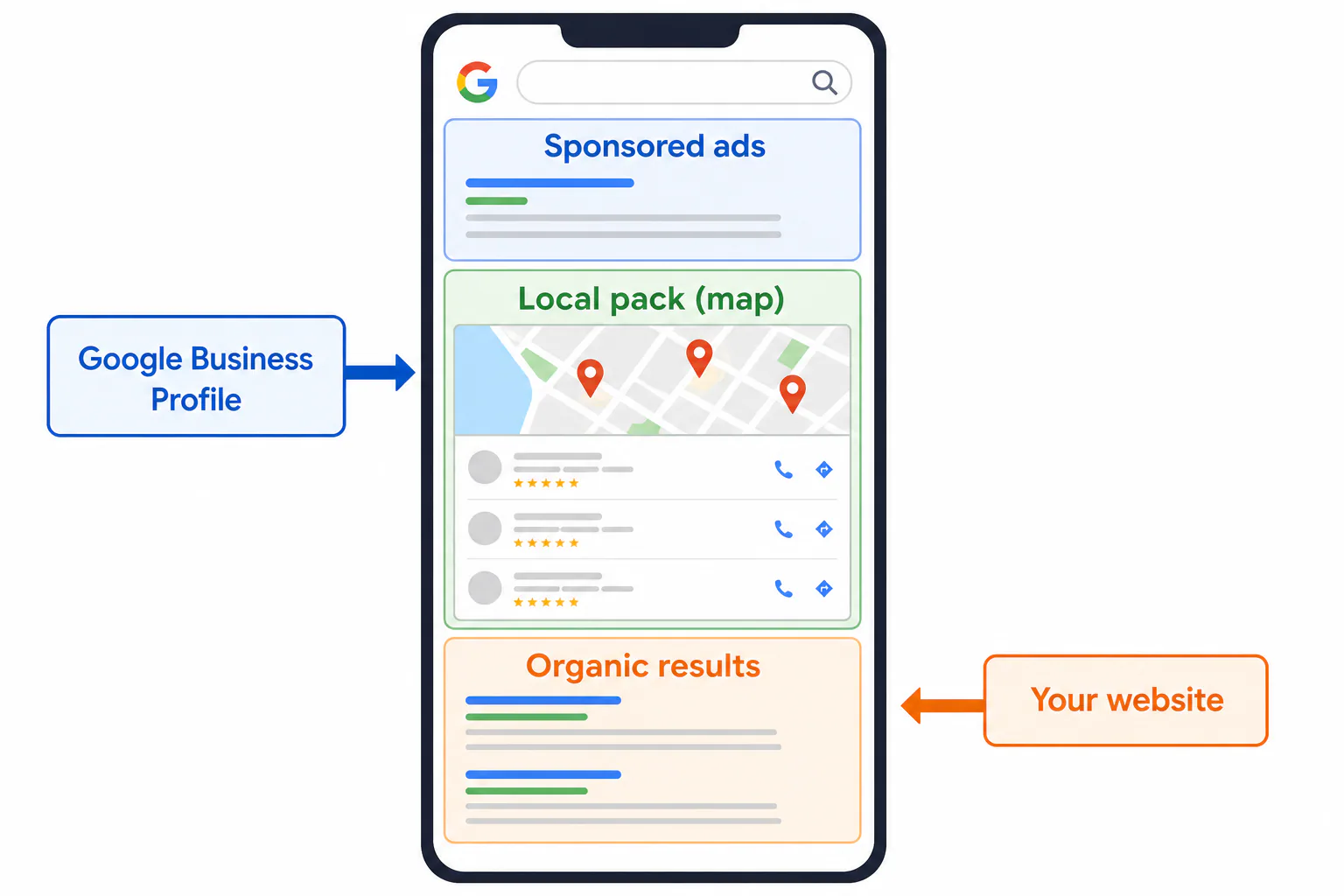
When you search for a service in San Diego on Google Search, Google usually shows a map with three businesses, the local pack, and below it the regular “organic” search results. Your Google Business Profile mostly drives the map, your website the organic listings. We treat them as one marketing job.
SEO for Beginners: The Basics You Can Start This Week
Here’s SEO for beginners, small business edition: four jobs you can start this week with free tools and no coding. Each one takes an evening or two, and together they cover the basics most guides list.
Set up Google Search Console and Google Analytics
Google Search Console is free and shows your site’s performance in Google search results: which search queries bring people in, how many clicks you get, and which pages Google couldn’t index. Google Analytics shows what visitors do once they arrive.
- Sign in to Search Console with a Google account and add your domain.
- Verify ownership. Your web host or website builder usually has a simple option for this.
- Submit your sitemap, usually at yourdomain.com/sitemap.xml, so Google knows every URL you want crawled.
- Set up Google Analytics and mark phone-number clicks and form submissions as key events.
Give both tools a few weeks to collect data before you judge anything.
Find the words your customers actually type
Your customers don’t search the way you talk. A plumber says “tankless water heater installation.” A homeowner types “water heater leaking what do I do.” The best keywords come straight from the customer’s mouth.
Start with these free sources:
- Google’s autocomplete: type your service plus your city and note the suggestions.
- The “People also ask” box in Google search results, which shows real questions.
- Google Keyword Planner, free with a Google Ads account, for rough search volume.
- Your own phone calls and emails. Write down the exact phrases people use.
Group your keywords by service and give each group its own page: one for “water heater repair,” another for “drain cleaning,” instead of one page trying to be relevant to everything.
Fix titles, headings and page content
The title tag (the <title> element in your page code) is the blue headline a search engine shows in results, and the easiest fix on most small sites. Many San Diego businesses still title their home page “Home.” Try “Water Heater Repair in Chula Vista, Same-Day Service.” Then follow these practices:
- Give each page one H1 heading that says what the page is about.
- Write a meta description that tells people why to click. Google doesn’t always use it, but when it does, it sells the click.
- Use a short, readable URL like /water-heater-repair/ instead of /page?id=482. Short URLs are easier for people and crawlers alike, and they’re one of the best practices to start with.
- Put real content on the page: what you do, where you work, what affects the price, and answers to the questions customers ask on the phone.
Check mobile layout, speed and HTTPS
Google uses mobile-first indexing, so it judges your site by its phone version. Open your site on your phone, call yourself, fill out the contact form and fix anything annoying. Run your home page through PageSpeed Insights (oversized photos are the usual culprit) and check that your address starts with https.
SEO for Local Business: Google Business Profile, Reviews and Maps
For SEO for local business, your Google Business Profile is the fastest way onto Google Maps and into the map pack. It’s free, and the map matters: 70% of such searches are done on Google Maps. If you only have time for one thing from this guide, make it this.
Claim and fill out your Google Business Profile
- Search for your business name on Google, or go to the Google Business Profile site and claim or create your listing.
- Verify it. Google may ask for a video, a phone call or a postcard, depending on your business.
- Pick the most specific primary category (“Plumber,” not “Contractor”) and add secondary categories that fit.
- Fill in every field: hours, services, service areas, a plain description, and your website.
- Add real photos of your team, your van, your shop and finished work, then keep adding new ones.
Treat the profile like a second website. A complete, active listing gives Google more reasons to show you.
Keep your name, address and phone number consistent
Google cross-checks your business details across the web. Your name, address and phone number (NAP) should read the same on your website, Google, Yelp, Apple Maps, Nextdoor, Facebook and industry directories. “Suite 200” versus “#200” is minor; a different phone number is not.
Get more Google reviews the right way
Google reviews affect both where you show up and whether people click. Ask right after a job goes well. Text the customer the direct review link from your listing, keep the ask short, and reply to every review, good or bad, with a calm, specific answer.
What not to do: don’t pay for reviews, offer discounts in exchange, post fake ones, or send the link only to happy customers while steering unhappy ones elsewhere. Google’s rules forbid all of these, and reviews can be removed or the profile restricted. Don’t script reviews or stuff keywords into your replies either.

A local SEO checklist for service-area businesses
If you go to your customers (plumbers, cleaners, mobile groomers, landscapers), work through this checklist:
- Hide your home address in your Google profile if customers don’t visit you there.
- List the cities and neighborhoods you really serve, such as Chula Vista, National City and Bonita, not the whole county.
- Build an area page only where you have real things to say: jobs done there, local conditions, drive times.
- Show the same phone number everywhere, ideally a 619, 858 or 760 number.
- Post job photos from each area.
- Ask for reviews after every job, and let customers mention the service and neighborhood in their own words.
- Join a few trusted directories in your trade, not hundreds of junk ones.
- Use profile Posts for offers, seasonal tips and recent work.
Links and Trust: How Other Sites Help Your Rankings
When another website links to yours, Google reads it as a vote of confidence. Search engine algorithms treat links from trusted, relevant sites as strong signals that your business is real. One link from a local news site or your trade association beats a pile from sites nobody visits.
Which links are worth earning
The best links make sense to a human: would a real person click this and land on your site? Good sources for a San Diego small business:
- Your chamber of commerce or business association member directory.
- Suppliers and manufacturers that list who sells or installs their products.
- Sponsorships, like a youth soccer team, a beach cleanup or a neighborhood festival.
- Local news or community blogs covering something you did.
- Trade associations and licensing bodies in your field.
These links send referral traffic of their own, a bonus on top of any search engine benefit. Ask partners to link to your exact service page, not a long, messy URL on some other part of your site. Then check that each partner’s link points to a live, relevant page, because link quality matters more than link count.
White hat SEO versus shortcuts that bring penalties
White hat SEO for small business means following Google’s published guidelines and earning attention instead of faking it. Shortcuts can put your whole site at risk, including a manual action shown in Search Console. Here’s how they compare with the safe route:
| Shortcut | Why it backfires | White hat alternative |
|---|---|---|
| Buying links in bulk | Easy to spot, can trigger penalties | Earn links from partners and local groups |
| Keyword stuffing | Reads badly, ignored or demoted | Write naturally for the customer |
| Fake or paid reviews | Removed, profile can be restricted | Ask every happy customer |
| Copy-paste city pages | Thin pages that rarely rank | Pages with real local detail |
If someone offers hundreds of links for a small fee, that’s the first row of this table. Stick to best practices you’d be comfortable explaining to a customer.
Building an SEO Plan for Small Business: A 30-Day Example
An SEO plan for small business doesn’t have to be fancy. Here’s an illustrative example, not a real client: a two-van plumbing company in Chula Vista serving the South Bay. Swap in your own trade and neighborhoods; the order of the work stays the same.
Week 1: tools, audit and keyword list
- Set up Search Console and Google Analytics and submit the sitemap.
- Do a quick audit: open every page on a phone and note slow pages, missing titles, broken links and pages with almost no content.
- Build a short list of keywords grouped by service, such as “water heater repair Chula Vista” and “emergency plumber National City.”
Week 2: Google Business Profile and on-page fixes
- Claim or clean up the Google Business Profile: category, service areas, hours, photos.
- Check NAP on the website, Yelp and Nextdoor and fix mismatches.
- Rewrite titles and H1 headings on the home page and main service pages to match the keyword groups, keeping the existing URLs.
- Compress large images and fix anything that breaks on mobile.
Week 3: first content pieces and review requests
- Write one full service page, “Water Heater Repair in Chula Vista,” covering what’s included, common problems and what affects the price.
- Write one blog post answering a question customers ask on the phone, like how San Diego’s hard water wears down water heaters, and link it to the service page.
- Text a review link to every happy customer from the past few months.
Keep the content relevant to the jobs you want more of. A page that brings traffic for work you don’t do is wasted effort, so follow the same practices on every page.

Week 4: measure, adjust and set the next 90 days
By now Search Console shows the first queries your pages appear for. Rewrite titles of pages with impressions but few clicks, and check your profile for calls. Then write a 90-day SEO strategy: a new page every couple of weeks, and review requests after every job.
What SEO Costs and How Long It Takes
SEO for small business can cost anything from your own time plus free tools to a monthly retainer, and the right budget depends on how competitive your trade is and how much work your site needs. There’s no single price, so here’s what moves it and how to judge any quote you get.
What drives the price of SEO
This table shows the factors that push a quote up or keep it down:
| Factor | Pushes the price up | Keeps it down |
|---|---|---|
| Competition | Personal injury law, dentistry or roofing in central San Diego | A niche trade in a smaller town like Ramona |
| Area served | Many cities or several shops | One neighborhood or one shop |
| Starting point | Slow, outdated site that needs rebuilding | Solid site that needs tuning |
| Content | New pages and posts every month | A handful of service pages |
| Links | Active outreach and link building | Directories and local partners only |
| Reporting | Call tracking and custom reports | A simple monthly summary |
When you compare quotes, ask each seller to itemize setup and audit, monthly tasks, content pieces per month, and what gets reported. A good quote shows the SEO strategy and optimization work behind the number. “SEO, so much a month” tells you nothing.
Quotes usually come in three pricing models. A monthly retainer fits ongoing work, like content and reporting. Hourly consulting fits a small question or a second opinion. A one-time project or audit fits a site that needs a clear fix list first. For real price ranges, see How Much Does SEO Cost for a Small Business? Real Price Ranges.
DIY, freelancer or agency: what each path involves
| Path | What you pay for | Time you put in | Best fit |
|---|---|---|---|
| DIY | Your time, free Google tools, maybe one paid tool later | Several hours a week, ongoing | One shop, low competition, you like learning |
| Freelancer | One person’s hours, often for a set task | Some, to brief and review | A defined job like an audit or new pages |
| Agency | A team covering technical, content, local and reporting work | Little, mostly approvals | Busy owners, competitive trades, ongoing work |
For a reference point on what a marketing agency charges for online work, see our own SEO and geomarketing plan below, which is priced monthly. Prices vary a lot, so compare what’s included, not just the total.
Realistic timing for rankings and calls
Expect weeks for small changes and months for big ones. A corrected Google profile, better titles and a submitted sitemap can improve performance soon after the search engine crawls the changed pages. Competitive searches like “roofer San Diego” take months. Nobody can honestly promise page one in days.
Calls tend to lag rankings: first you see impressions for more queries in Search Console, then more clicks, then the phone rings more.

What results look like for San Diego small businesses
SEO results for a San Diego small business show up first in your Google profile: more views, calls from Maps and direction requests. Then organic traffic to your service pages climbs. One example: Local San Diego Painting makes the top 3 in Google listings, helped by 2 blog posts per month.
Results depend on your trade and part of town. A pest control company covering the whole county faces a harder climb than a bike shop in Ocean Beach. Track calls and booked jobs, not rankings alone. No honest company can guarantee a ranking position.
DIY or Hire Help: A Simple Decision Rule
Do SEO yourself if you have one shop, moderate competition and a few hours a week you’ll protect. Hire help if your trade is competitive, your site has technical problems, you serve many areas, or three months of work hasn’t brought more calls. Most owners land in the middle.
Tasks worth keeping in-house
- Asking for and replying to reviews. They’re trust signals, and customers respond to the owner’s voice.
- Adding photos and Posts to your Google profile.
- Supplying the questions that become content; you know what customers ask better than any writer.
- Updating hours, holidays and phone numbers.
- Watching calls and leads so you know what’s working.
Tasks worth handing to a specialist
- A technical audit: crawling errors, speed, mobile problems, broken redirects.
- Moving to a new website or domain, where missing redirects for old URLs can wipe out rankings.
- Keyword research and an SEO strategy for competitive services.
- Regular content writing that reads well and is properly optimized.
- Link outreach and directory placement.
- Reporting that ties search engine data to calls.
How to choose the best SEO company for small business
The best SEO company for small business is the one that explains what it’s doing in words you understand and reports on results you care about. Look for:
- Plain explanations, not a wall of jargon.
- Real local examples they can show you.
- White hat best practices, stated in writing.
- Your ownership of the website, domain, Google profile and analytics accounts.
- Reports on calls, leads and relevant traffic, not just rankings.
- No guaranteed rankings. That promise is the clearest red flag in the business.
Questions to ask before you sign
- What exactly will you do in the first 30 days?
- Who works on my account?
- How do you get links, and can I see examples of the sites that link to your clients?
- What will you report each month, and how does it connect to calls?
- Which tools do you use, and will I have access?
- How long is the contract, and what happens to my content if I leave?
- How does your SEO strategy for my trade differ from what you do for others?
SEO Services from Websites San Diego
We’re a San Diego digital agency offering website design and development, SEO and geomarketing, content writing and other digital marketing services for local businesses. We’ve spent 30 years helping businesses succeed online, and we explain everything in plain language. Here’s how our plans line up with the work in this guide.
SEO and GEO marketing from $159+ per month
Our SEO and GEO marketing plan covers the map side: we set up and maintain your Google Business listing, place you in directories and use white-hat SEO. That’s the profile, consistency and directory work from the local section above, handled for you every month so your visibility gets steady attention.
Blog writing and keyword content from $129.00 per month
If writing isn’t your thing, our blog writing and tailored keyword SEO plan gives you SEO-optimized blog content with tailored keywords, posted to social media. It’s the content part of the 30-day plan, done month after month, aimed at bringing your site more relevant traffic that turns into calls.
A website built to rank, from $99.00 per month
Everything above works better on a fast, mobile-friendly site with a clean URL structure. We offer a complete service, from concept and design to the final SEO campaign. Want a plan first? Our digital marketing consulting covers business analysis, strategy development and continuous monitoring.
Not sure where your site stands? Request a free SEO review of your website from Websites San Diego, and we’ll tell you straight what’s worth fixing first.
Frequently Asked Questions
Can I do my own SEO for my business?
Can I do my own SEO for my business?
Yes. Many owners handle the basics themselves: the Google Business Profile, reviews, page titles and a few strong service pages. That’s often enough for a single location in a less crowded trade. Where people get stuck is technical repairs, site moves and steady content in competitive markets. Start on your own, track calls for a few months, and bring in help for the parts that stall.
Can a beginner do SEO?
Can a beginner do SEO?
A beginner can absolutely do the core work. You don’t need coding skills or paid software, just free Google tools and some patience. Learn how to read Search Console, write clear titles and ask for reviews, then follow Google’s own best practices. The learning curve is real but gentle. The hard part for most owners isn’t skill; it’s finding a few hours every week and sticking with it.
How much should SEO cost for a small business?
How much should SEO cost for a small business?
It depends on competition, the area you serve, the state of your site and how much content you need each month. Doing it yourself mostly costs time. Agency plans cost more but take the work off your plate; ours start at $159 a month for SEO and geomarketing. Whatever you pay, insist on an itemized quote and monthly reports tied to calls and leads.
Do small businesses need a Google Business Profile for SEO?
Do small businesses need a Google Business Profile for SEO?
If you serve local customers, yes. The profile is what puts you on Google Maps and in the local pack, and it’s free. Even businesses without a storefront, like mobile detailers or house cleaners, can list their service areas and hide their address. Without a profile, you’re leaving the map to your competitors, no matter how good your website is.
What free SEO tools should a small business use?
What free SEO tools should a small business use?
Start with Google Search Console for queries, clicks and indexing problems, Google Analytics for visitor behavior, and Google Business Profile for map performance. Add Google Keyword Planner for search volume, PageSpeed Insights for speed and mobile checks, and Bing Webmaster Tools, since Bing is the other search engine worth covering. That set handles nearly everything a small business needs before paying for anything.