

Small business web design comes down to three choices before you hire: who builds your website, how you pay (one big fee or a monthly plan), and how much content you supply. Those choices decide whether your website brings in calls or just sits there.
Most business owners get told to “just get a website” and are left to figure out the rest. This guide covers the options, the cost drivers, what a good website includes, and your workload from kickoff to launch. We’ve spent 30 years helping businesses succeed online.
Why a Website Matters for a Small Business
A website is where people decide whether to call you, and business owners often underestimate that. Your Google listing, a neighbor’s recommendation or a flyer gets them curious. Your website is what turns that curiosity into a phone call, a booking or a visit from potential customers.
What customers check before they call you
Before customers pick up the phone, they run a quick check, usually on their phone. They look for:
- The exact service they need, named in plain words
- Proof you work in their neighborhood
- Your hours, and a phone number they can tap
- Real photos of your work, your shop or your crew
- Reviews that show other people trusted you
- A rough idea of price, or at least how pricing works
Picture a homeowner in Clairemont with a leaking water heater. They search “water heater repair near me,” open three results, and call the one that says “We serve Clairemont” beside a big call button. A dated site with a broken contact page loses them to the next tab.
What a website does that a social page cannot
Social pages are worth having, but they’re rented space. The platform decides who sees your posts, how your page looks and whether your account stays up. Your website is the one part of your online presence you actually own, and it anchors your whole presence on the web.
It also does jobs a social page can’t do well:
- Shows up in Google and other search engine results for searches like “kitchen remodel Escondido,” where social posts rarely appear
- Gives each service its own page, with prices, FAQs and photos that don’t scroll away
- Collects quote requests through a form that lands straight in your inbox
- Gives your Google Business Listing a solid page to link to
Think of social media as the conversation, and your website as the storefront people walk into once that conversation makes them curious. Together they build a strong online presence.
Who Builds It: DIY Builder, Freelancer or Agency
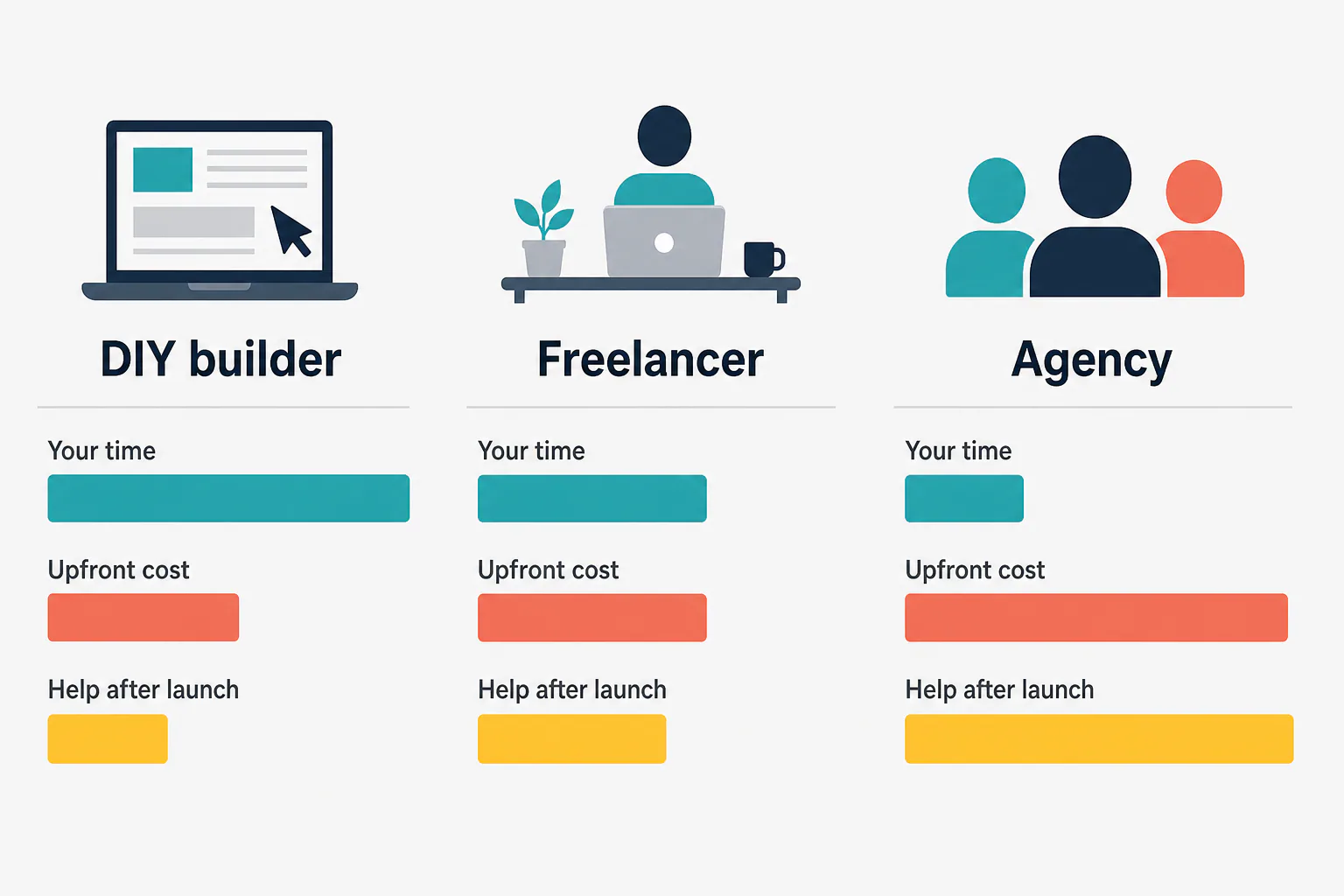
Small business web design gets done three ways: do it yourself on a website builder, hire a freelancer, or hire an agency. Each trades money for time and skill differently, so the right pick depends on what you have the most of.
Building it yourself with a website builder
Builders like Wix and Squarespace let you pick a template, drag in text and photos, and publish without touching code. Web design for beginners has never been easier on the looks side. You pay the builder a monthly fee and do the work yourself with their tools.
The catch is that layout is the easy part. Writing copy that sells, search optimization, connecting your Google Business Listing and fixing breakages all land on you. For many owners, the real price is evenings and weekends spent learning the tool, and the optimization work never really ends.
Hiring a freelancer
A freelancer is one person who designs and builds your website, often for less than an agency, with a direct line to whoever is doing the work. For a simple, clearly defined project, a good one can be a great fit.
Quality and reliability vary a lot from one freelancer to the next. Some are great designers but don’t touch SEO; some do both. Ask up front who handles hosting, edits and updates after launch, and make sure the domain and every login are in your name.
Hiring a web design agency
A web design agency puts a team on your project: design, development, often SEO and content. You get a set process, a clear review process, backup when one person is out, and one place to call. Some agencies charge a large one-time fee; others, like us, offer monthly plans.
An agency fits best when you want the website built and also found, and you don’t have time to manage every piece of your online presence yourself. Many business owners reach that point fast.
The honest downsides of each option
Every option has a weak spot. This table shows the problems vendors don’t usually mention:
| Option | Main downside | Hidden cost | Lock-in risk |
|---|---|---|---|
| DIY builder | Your time; easy to end up with a nice-looking page nobody finds | Paid apps, premium templates, email, higher renewal prices | Leaving most builders means rebuilding from scratch |
| Freelancer | Everything depends on one person’s schedule | Hourly fees for every edit after launch | Domain or hosting sometimes registered in their name |
| Agency | Higher one-time fees at some shops; more steps | Long contracts, charges for “out of scope” changes | Some keep ownership of the design if you cancel |
A simple rule for choosing by budget, time and skill
Use your budget, your free time and your comfort with tech as the test:
- Go DIY if money is very tight, you have several free evenings a month, and you enjoy learning software. It’s a good start for a brand-new side business testing an idea.
- Hire a freelancer if you need a simple website, can write your own content, and don’t mind managing the project and finding SEO help separately.
- Hire an agency if your hours are worth more on the job than on a laptop, you want calls from Google, and you’d rather have one team handle design, hosting and SEO.
Still stuck? Ask yourself who will update the website a year from now. If the honest answer is “nobody,” skip DIY.
What Small Business Web Design Costs
There’s no single honest price for small business web design, because a five-page site for a dog groomer and a 30-page one with booking and a store are different jobs. Learn what moves the price, choose how to pay, and make every quote list the same items.
What drives the price up or down
These are the things that push a quote up or down:
- Number of pages. Every service page and service area page is real work.
- Who writes the content. Supplying your own text and photos costs less; professional copy costs more but usually sells better.
- Template vs custom design. A customized template costs less than a layout created from scratch.
- Features. Booking, payments, an online store, file uploads or a member login.
- SEO setup. Basic on-page optimization is one thing; an ongoing local search campaign is another.
- Revisions and speed. Extra rounds of changes or a rush deadline add hours.
One-time fee vs monthly website plans
A one-time fee buys the build. You usually own it outright, but you still pay separately for hosting, the domain, security updates and changes after launch. Monthly website plans spread the cost out and usually bundle hosting and upkeep, so the upfront hit is small.
Here’s how the two models compare:
| One-time fee | Monthly plan | |
|---|---|---|
| Upfront cost | Large | Small |
| Hosting and upkeep | Paid separately | Usually included |
| Edits after launch | Billed per job | Often included up to a limit |
| Main risk | The website goes stale without upkeep | Locked into terms you didn’t read |
Small business website plans with a monthly price
Good small business website plans spell out exactly what the monthly fee covers. Check any plan against this list:
- Hosting and an SSL certificate (the padlock in the browser bar)
- Software and security updates
- Regular backups
- A set number of content edits per month
- Support by phone or email, with a stated response time
- Who owns the domain and the content if you cancel
- Whether SEO or Google Business work is included or sold as a separate service
Our own plans are covered near the end of this guide, along with our SEO Marketing, which is priced monthly.
Hidden costs to ask about: hosting, add-ons, renewals, edits
Most budget surprises show up after launch. Get an answer in writing on each of these:
- Domain name renewal. First-year prices are often promotional, and the renewal can cost more.
- Hosting renewal. Intro hosting deals work the same way.
- Add-ons and apps. Booking widgets, review feeds and store features often carry their own monthly fees, sometimes charged per user.
- Licenses. Premium themes and stock photos can carry their own fees.
- Business email. An address like you@yourbusiness.com is usually billed on its own.
- Edits. Is changing a price on your menu a free five-minute task or a billable hour?
To compare quotes fairly, add the upfront fee to two years of every monthly charge for each option. That two-year total tells you far more than the headline price does.
What Good Website Design for a Small Business Includes
Good website design for small business gets a visitor from “who is this?” to “let me call them” as fast as possible. That takes the right pages, one clear next step on each, and words and photos that are obviously yours.
The pages most local sites need
Most local businesses need these pages to start, and not much more:
- Home: what you do, where, and how to reach you, all visible without scrolling.
- Services: one page for each main offering, so each can show up for its own search.
- About: who’s behind the business, how long you’ve been at it, and any licenses your trade requires.
- Reviews: real quotes, with first names and neighborhoods.
- FAQ: the questions you keep answering on the phone.
- Contact: phone, a short form, hours, a map and the areas you cover.
Service area pages come next; we cover them in the local section below.
A clear call to action on every page
Every page should end with one obvious action: call, book, or request a quote. Pick the one that matches how you actually win jobs. A plumber wants calls, a salon wants bookings, and a contractor wants quote requests with photos attached.
Put a tap-to-call number in the header, repeat the main button after each section, and keep your form short. Name, phone and “What do you need?” is plenty. “Get your free estimate” beats “Learn more” because it tells potential customers exactly what happens next.
Real photos and plain copy instead of filler
Stock photos of smiling people in headsets tell visitors nothing. A shot of your actual crew, your truck or a finished job on a recognizable street tells each user you’re real and local. Phone photos in good daylight work fine.
Write the way you talk to customers. “We fix leaky roofs in Poway and Ramona” beats “We provide comprehensive roofing solutions.” Need a matching logo? Our graphic design help covers logos, promotional materials and digital graphics, and we’ve done it for over 25 years.
Why Your Site Must Be a Mobile Friendly Small Business Website
Many people look up local businesses on a phone, so a mobile friendly small business website gets judged first. If it’s cramped, slow or hard to tap, every user leaves. A user friendly website keeps them, and Google also looks mainly at the phone version when ranking.
How to test your site on a phone in five minutes
You don’t need any special tools for this. Grab your own phone, turn off Wi-Fi so you’re on cellular data, and run through these steps:
- Search your business name and open your website from the results.
- Watch how long it takes before you can read the main headline. If you get impatient, so will customers.
- Read the home page without pinching or zooming.
- Tap the phone number. It should open your dialer.
- Open the menu and reach your services page in two taps or fewer.
- Fill in your contact form and check that the message actually reaches your inbox.
- Hand the phone to someone over 60 and watch them try to call or book.
Anything that fails here is worth fixing before you spend a dollar on new design.
Speed, readable text and tap-friendly buttons
Mobile-friendly small business web design comes down to three things. Speed: compress images before uploading. Readable text: large body copy in short paragraphs. Tap-friendly buttons: big enough for a thumb and well spaced.
Good designers start with the phone layout and expand it for desktop, instead of squeezing a desktop page down. That approach is called mobile-first design, and it’s the easiest way to keep the experience user friendly for every user who finds you on the go.
Accessibility basics: alt text, contrast and labels
Accessibility means people with low vision, color blindness or other disabilities can use your website too, and the basics are simple. The common reference is WCAG, the Web Content Accessibility Guidelines. Start with these:
- Alt text: a short description on each image, like “Painter rolling white paint on a living room wall,” so screen readers can describe it.
- Contrast: dark text on a light background; avoid light gray on white.
- Labels: every field needs a visible label, not just faded placeholder text that vanishes when someone types.
- Link text: “See our pricing” instead of “click here.”
Good accessibility makes things easier for all visitors, including anyone squinting at a phone in bright San Diego sun. Accessibility also helps you build a friendly website that more people can use.

Setting Up the Basics: Domain, Hosting and Platform
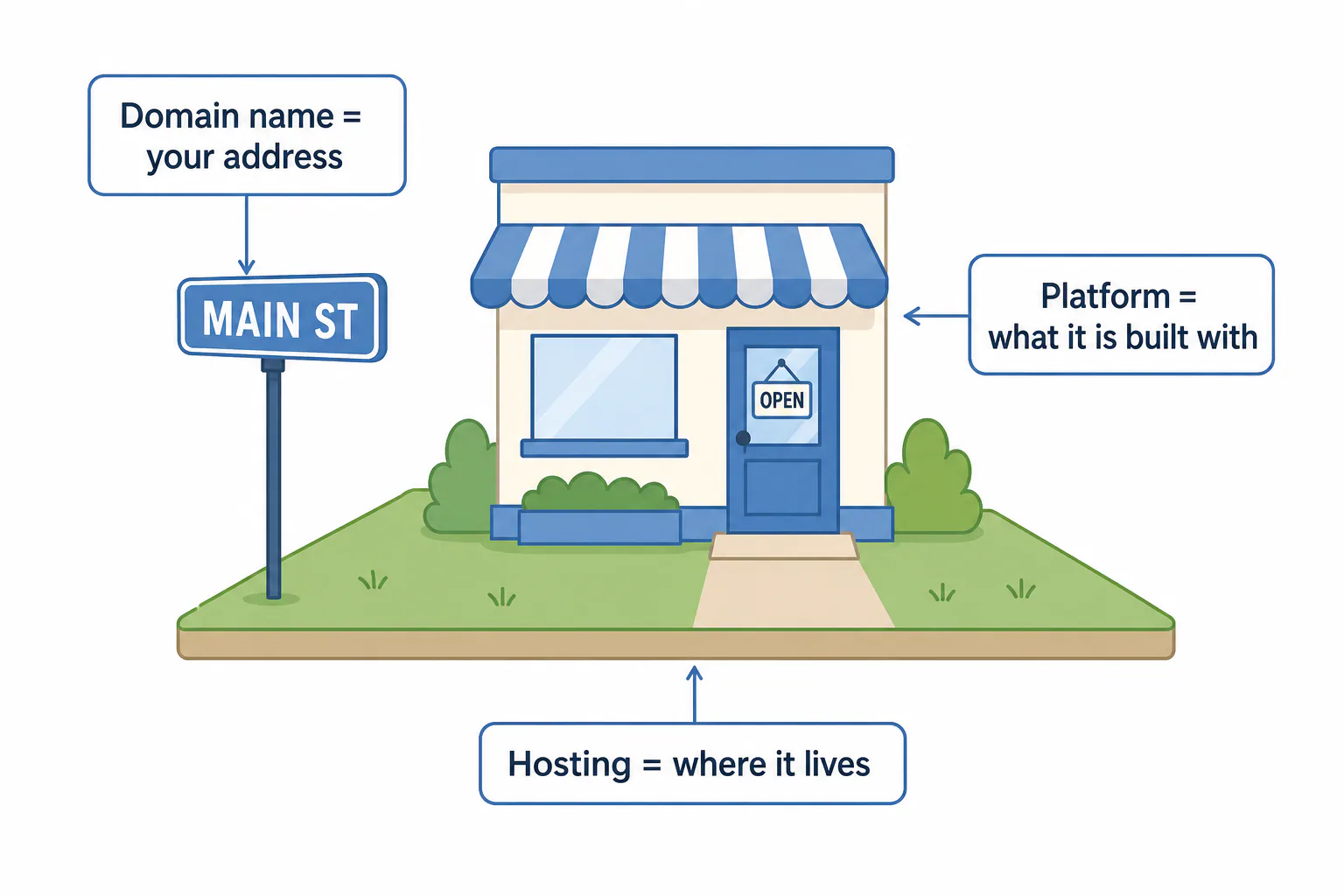
Every small business web design project rests on three pieces: a domain name (your online address), hosting (the computer that stores your pages), and a platform (the software it’s built on). If you hire someone, make sure nothing ends up owned by the wrong person.
Choosing and registering a domain name
A good domain name is short, easy to say over the phone, and ends in .com if possible. Your business name works best. If it’s taken, add your trade or area, like the made-up riveraplumbingsd.com. Skip hyphens and numbers.
Register the domain yourself, under your own name and email, and turn on auto-renew. If a designer registers it, ask them to move it to your account. Losing a domain held by a former designer is painful and easy to avoid.
What hosting does and who should handle it
Hosting is the rented space where your website lives. Wix, Squarespace and Shopify include it; with WordPress.org you or your designer choose a host. Simplest is to let whoever maintains the website handle hosting, backups, SSL, security updates and a full copy if you leave.
Website builders compared: Wix, Squarespace, Shopify, WordPress and Webflow
Each of these is a capable website builder; the real question is which one fits your business and your skills. This table compares the five most common platforms:
| Platform | Best for | Skill needed | Watch out for |
|---|---|---|---|
| Wix | Service businesses that want drag-and-drop freedom | Low | Hard to move elsewhere; apps add monthly costs |
| Squarespace | A polished look for studios, portfolios and consultants | Low | Less layout flexibility; fewer add-ons |
| Shopify | Selling products online, or in a shop and online together | Low to medium | Many store features come from paid apps |
| WordPress (WordPress.org) | Content-heavy websites that need SEO control and room to grow | Medium, or hire help | You manage hosting, updates and plugins, or pay someone to |
| Webflow | Custom, design-heavy websites built by a designer | Medium to high | Steep learning curve for owners making their own edits |
Framer is a newer option in the same design-first space as Webflow. If you hire a pro, ask which platform they use, why, and whether you’ll be able to make simple edits yourself after launch.
Getting Found Locally: SEO, Google Maps and Service Areas
A great-looking website does little if nobody nearby finds it. For a local business, getting found starts with your Google Business Profile, continues with pages built around the areas you serve, and grows through steady SEO work that helps each search engine understand your site.
Google Business Profile and why it comes first
Your Google Business Profile (we call it your Google Business Listing) appears in map results and in the panel beside them when someone searches your name. It’s free, and for many local searches it shows before any website. Set it up before or alongside your new pages, since the setup process takes a few days:
- Pick the most accurate primary category, then add secondary ones.
- Use the exact same business name, address and phone number as your website.
- Add hours, services, service areas and real photos.
- Link to your website, ideally to the most relevant page.
- Ask happy customers for reviews and reply to every one.
If you’d rather hand it off, our Google Business Listing expert service covers setup and optimization.
Why a business may not show up on Google Maps
When a business is missing from Google Maps, the cause is usually one of these:
- The profile isn’t verified yet, or the verification process stalled.
- The primary category doesn’t match what people search for.
- Your name, address or phone differs between your website, your profile and directories.
- The searcher is far from you, and closer competitors have more reviews.
- The profile was suspended over a guideline problem, such as keywords stuffed into the business name.
- It’s simply new, and new profiles take time to earn trust.
Search your exact business name on Maps first. If you show up for your name but not for “electrician near me,” that’s a ranking problem, not a listing problem.
Service area pages and local content
Service area pages target each city you really work in, such as “Water damage restoration in Chula Vista.” They work only with real local content: jobs done there, photos, local details and nearby reviews. Copying one page twenty times and swapping the city name doesn’t fool anyone.
What SEO adds after the website is live
Launch is the starting line for search. On-page optimization, listings, blog content, reviews and local links keep building afterward. Local San Diego Painting makes the top 3 in Google listings with 2 blog posts a month for over a year. Results vary. Our SEO Marketing plan covers this monthly.
From Kickoff to Launch: A Sample Timeline and What You Provide
A simple small business website of five to ten pages can go from kickoff to launch in about a month when your content arrives on time. Here is the process, with your share of the work at each stage. Bigger projects take longer.
Weeks 1 to 2: goals, pages and content gathering
This is when you do the most work. Expect a kickoff call about your goals (more calls? more bookings?), your best customers and your competitors. Then you gather the content:
- Logo files and brand colors
- A list of what you offer, with the jobs you want more of marked
- The cities and neighborhoods you cover
- A solid batch of real photos of your work, team and location
- Reviews or testimonials you’re happy to show
- Answers to the questions customers ask most
- Logins for your domain, current website and Google Business Profile
A shared folder in any file-sharing tool keeps this organized. Missing content is a common reason a launch slips, so send yours early, even if it’s rough.
Weeks 3 to 4: design, review and revisions
Most designers build the home page first, show it to you, then do the rest. Your job is review: check every page on your phone and collect your feedback into one list instead of ten emails. Ask how many revision rounds the process includes, and how the approval process works.
Specific feedback gets fixed fast. “Make the phone number bigger and move reviews higher” takes minutes; “make it pop” starts a guessing game.
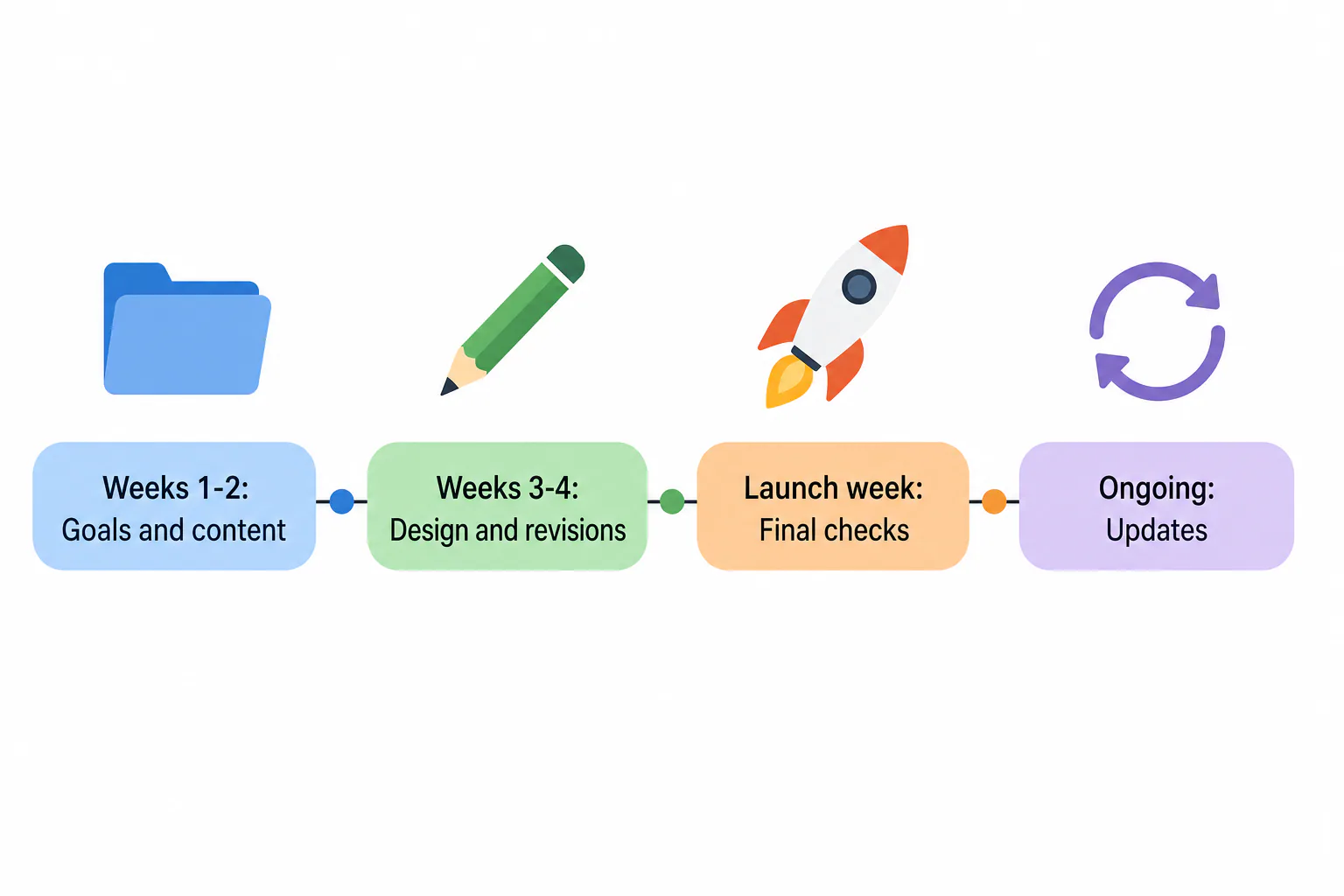
Launch week: final checks before going live
Before the new website goes live, run through this checklist:
- Every form sends to the right inbox, and you actually receive the test message
- Phone numbers dial when tapped
- Every page passes the five-minute phone test above
- Old page addresses redirect to the new ones, so old links and rankings carry over
- Analytics and Google Search Console are connected
- Your Google Business Profile links to the new pages
- Alt text and contrast are checked for accessibility
- Domain and hosting are in your name
Keeping it current: how often to update your website
Change hours, prices and offerings the day they change. Add fresh photos and reviews every month or two. Plan a design refresh every few years. If nobody on your team will own updates, build them into your plan with whoever maintains the website, including accessibility checks.
How to Find and Vet a San Diego Web Designer
The best way to vet a San Diego web designer is to look at sites they’ve already built for businesses like yours, read what past clients say, and ask direct questions about ownership and ongoing costs before you sign anything.
Reading reviews and checking past work
Start with their Google reviews, and read the three-star ones before the five-star ones. Middling reviews show what goes wrong and how the designer responds. Look for mentions of communication, deadlines and support after launch, since that’s where working relationships usually go sour.
Then test their portfolio. Open three or four client sites on your phone: are they live, fast, with a working contact form? Search a trade plus a neighborhood, like “landscaper Encinitas,” and see whether clients appear. An agency that can’t get itself found will struggle to get you found.
Questions to ask before you sign
Get clear answers to these before any money changes hands:
- Who owns the domain, the design and the content if we part ways?
- What exactly does the monthly fee or one-time price include?
- How many revision rounds are included, and what does an extra one cost?
- Who writes the copy, and who supplies photos?
- How do I request edits after launch, and how fast are they done?
- Do you handle accessibility basics like alt text, contrast and field labels?
- Do you set up my Google Business Profile and basic SEO, or is that extra?
- Can you guarantee me first place on Google?
That last one is a test. Nobody controls Google, so the honest answer is no. Walk away from anyone who promises rankings.
What Websites San Diego offers, starting at $99 a month
Our websites start at $99 a month, so you get a professional website without a big upfront bill. We handle design, development and the SEO campaign start to finish, in plain language, backed by 30 years of helping businesses succeed online across San Diego and beyond.
When you’re ready to grow, we add SEO Marketing monthly, Google listing setup and optimization, and Digital Marketing Consulting for analysis, strategy and monitoring. We won’t promise rankings or traffic. We will set your website up so it gets SEEN.
Frequently Asked Questions
How much does it cost to hire a developer for a website?
How much does it cost to hire a developer for a website?
The cost to hire a developer depends on how many pages you need, a template versus a custom design, features like booking or an online store, and who writes the content. You’ll pay either a one-time project fee plus separate hosting and edits, or a monthly plan. Our websites start at $99 a month.
How do I build a free website for my small business?
How do I build a free website for my small business?
Free plans from builders like Wix or WordPress.com let you publish a basic website at no cost, but they show the builder’s ads and use their subdomain instead of your own domain name. Pair it with a free Google Business Profile. Free works for testing an idea; once customers start finding you, your own domain and an ad-free plan look far more trustworthy.
Can I still design an effective site if I don’t know much about coding?
Can I still design an effective site if I don’t know much about coding?
Yes. Wix and Squarespace are made for people who never touch code: you pick a template and edit by clicking. What decides whether your website works isn’t coding. It’s clear service pages, real photos, a strong call to action, a fast phone version and basic local SEO. Those take time and judgment more than technical skill.
Should I hire a web design agency or a freelancer?
Should I hire a web design agency or a freelancer?
Hire a freelancer for a simple, well-defined website when you can supply the content and manage the project yourself. Choose a web design agency when you want design, hosting, SEO and ongoing updates from one team, with backup if someone is out. Either way, confirm you own the domain and the website, and get every ongoing cost in writing.
Which website builder is best for a consulting business?
Which website builder is best for a consulting business?
For most consultants, Squarespace or Wix is the easiest fit: polished templates, built-in appointment booking and simple blogging for sharing expertise. Choose WordPress if you plan to publish lots of articles and want full SEO control. Whatever you pick, the essentials are the same: a clear page about your services, proof of results, and one easy way to book a call.