

Digital marketing for small business means getting found online by nearby people who already need what you sell, then making it easy for them to call, book or buy. You don’t need to be everywhere: a solid website, a complete Google Business Profile and steady reviews beat any trendy channel.
Owners hear they should post daily, run ads and dance on TikTok. For a small shop, most of that is noise. Below you’ll find which channels matter, what they cost and a 90-day plan. Good digital marketing for small business is simple, so we explain it in plain language.
What Digital Marketing Means for a Small Business
Digital marketing in plain words
Digital marketing is any effort to win customers through the internet: your website, search results, maps, email, social media and online ads. The tools change every year, but the job stays the same: tell your audience you exist and give them a reason to come to you.
The digital marketing basics come down to three questions. Can people find you? Do they trust what they see? Is it easy to contact you? Every channel here answers at least one. For business owners, that’s a handy filter: if a tactic helps with none, skip it.
How it differs from traditional advertising
Traditional advertising, such as a newspaper ad, a flyer or a billboard, reaches everyone passing by, and you rarely know who responded. Online, you mostly reach people already looking, and the data shows visits, calls and which page sent them. Ads usually charge per click, so start small.
Why local customers now start on Google
Think about the last time you needed a plumber in a new neighborhood. You grabbed your phone. Local customers do the same: they search “roofer near me”, read reviews and call. Of local searches, 70% happen on Google Maps, so owners without a full profile are invisible.
Digital Marketing Strategies That Work for Small Businesses
The digital marketing strategies that work best for small business put you in front of people who are already looking for you. These six marketing strategies matter most, in the order most local businesses should tackle them:
- A website built to turn visitors into calls and bookings
- Local SEO and a complete Google Business Profile
- Helpful content and a blog that answers customer questions
- Email marketing that brings past customers back
- One social media platform where your customers already spend time
- Paid ads for a fast, measured boost
A website that turns visitors into calls and bookings
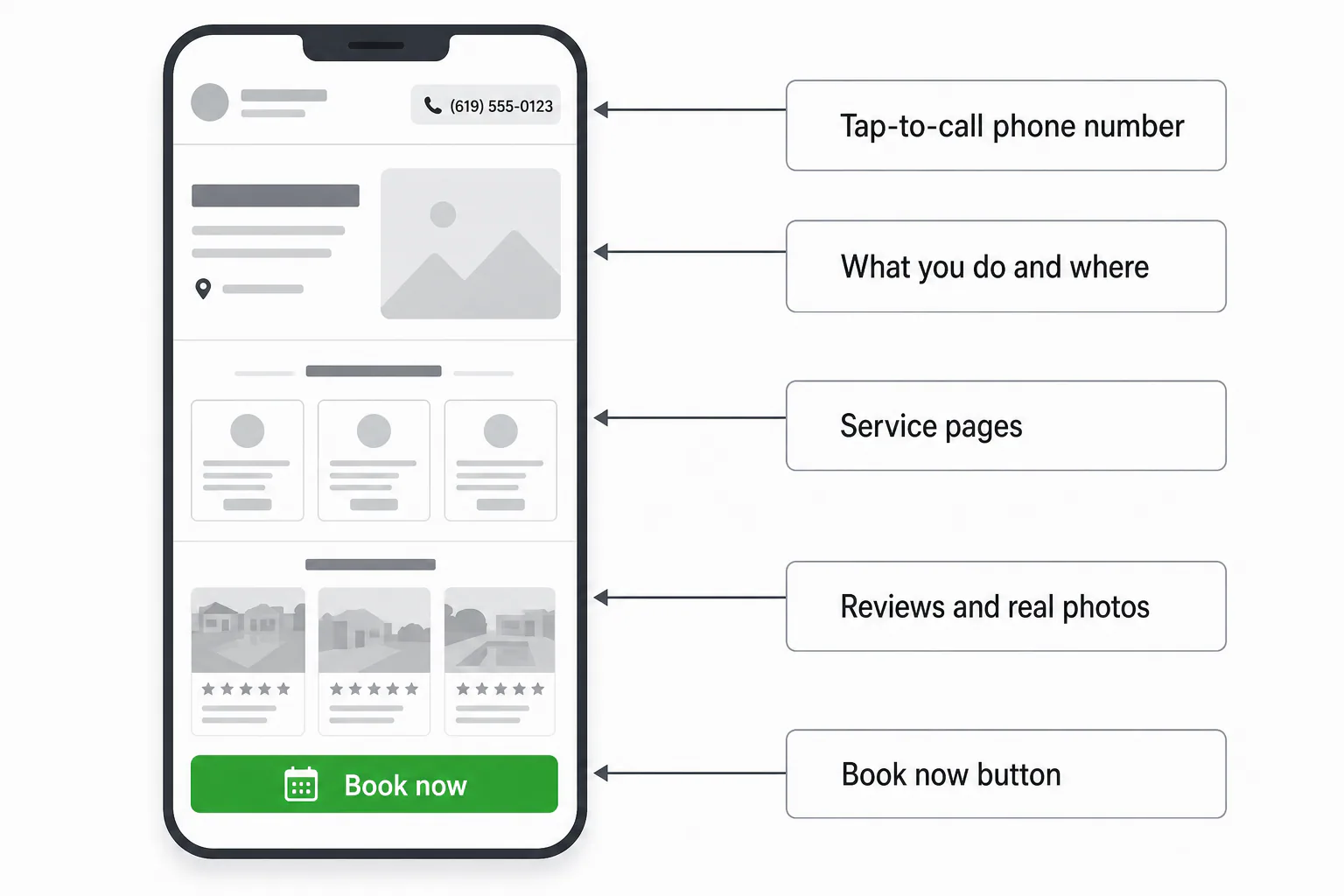
Your website is the one place online you fully control. The first screen should say what you do, where you do it and how to reach you. A pretty site that hides the phone number loses calls. Build every page around one action: call, book or request a quote.
Local SEO and Google Maps visibility
Local SEO is search engine optimization aimed at people nearby. Your business name, address and phone match everywhere online, your profile is complete, your site names the areas you serve and you’re in local directories. That’s how you land in map results and “near me” lists.
Content and blogging
Every question a customer asks on the phone is a blog post waiting to be written: “How often should I repaint stucco?” Helpful content builds trust. Local San Diego Painting makes the top 3 in Google listings with 2 posts a month for over a year.
Email marketing
Email marketing is the cheapest way to earn repeat business. Collect addresses with permission at checkout or on your booking form, then send your audience something useful once a month. Drip campaigns, short automatic email series sent after someone signs up, follow up with new leads while you work.
Social media
Social media works when you pick one platform your audience actually uses and show up regularly. A bakery or salon lives on Instagram photos; a contractor may do better in Facebook neighborhood groups. Post twice a week with real photos of your work.
Paid ads
Pay-per-click (PPC) advertising puts you at the top of the results page or in social feeds. It can bring calls the day you switch it on and stops when you stop paying, so treat it as a boost. For neighborhood reach, we also run local advertising on Nextdoor.
Marketing Channels for a Small Business: Which One to Start With
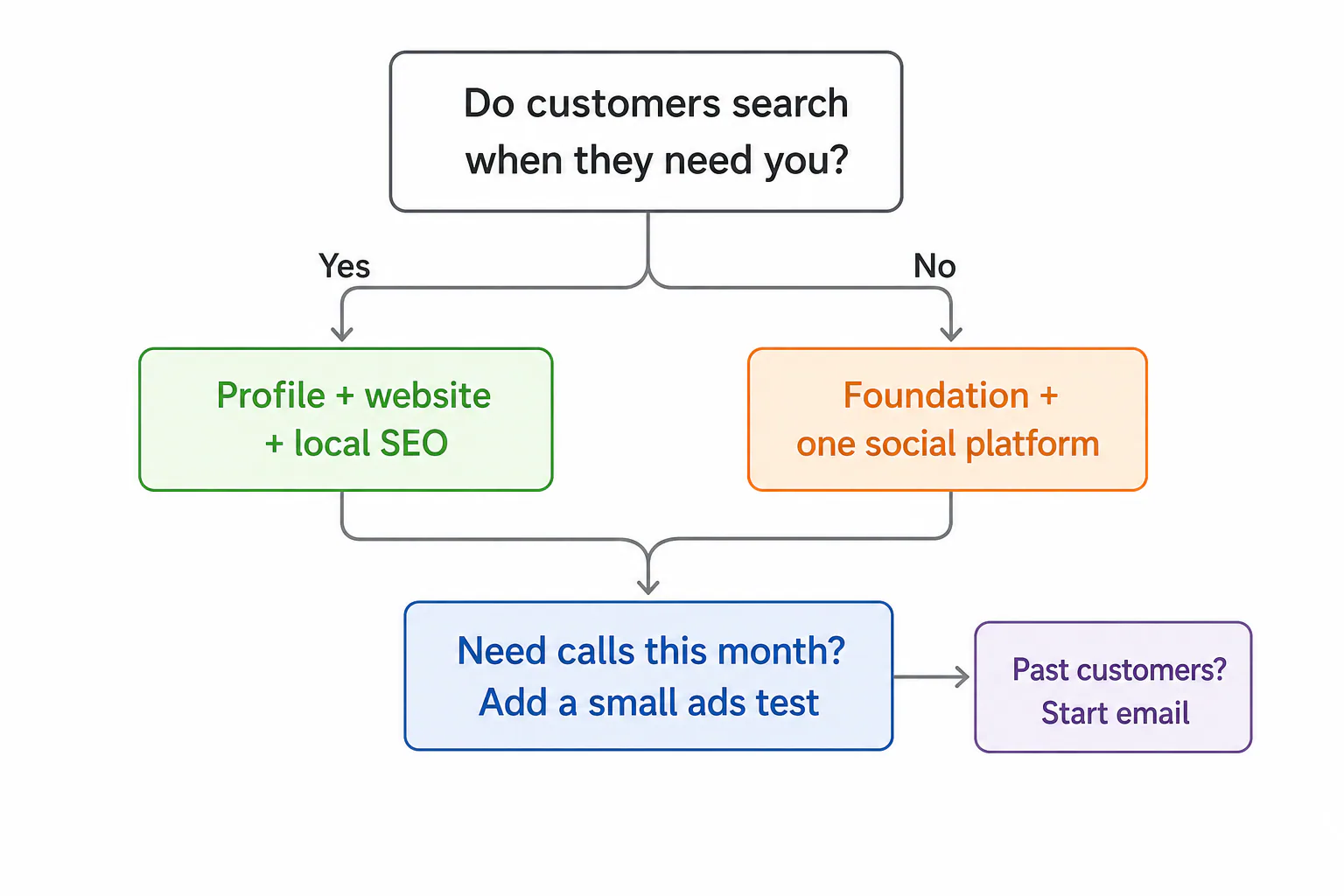
Start with the channel your customers already use when they need you. Good digital marketing for small business begins with maps and your website, and everything else gets added once that foundation works.
A decision rule based on your customers and budget
Use this rule to choose among the marketing channels for small business:
- Customers search when a need comes up (plumber, dentist, lawyer, auto repair): start with your Google Business Profile, your website and local SEO.
- Your audience buys on looks or mood (bakery, florist, boutique, salon): build the same foundation, then add one visual social platform.
- You need calls this month and have some cash: run a small, tightly targeted ads test on top of the foundation, never instead of it.
- You already have a list of past customers: start email marketing now, since it costs almost nothing.
On a very tight budget, spend time before money. Your profile, reviews and email are mostly effort, not cash.
When social media and paid ads waste money
Social media wastes time when your customers don’t buy that way. Few people scroll Instagram looking for a septic inspection. If your work is needed in an emergency or once every few years, posts won’t move the needle much; reviews and maps will.
Paid ads waste money in three cases: they send clicks to a slow site that frustrates every user, the targeting covers a whole county when you serve three ZIP codes, or nobody tracks which clicks became calls. Fix the site and set a tight service area first.
A comparison table of channels: cost, speed, effort
Here’s how the main channels compare for a typical local business:
| Channel | Cost to start | How fast it works | Your effort | Best for |
|---|---|---|---|---|
| Business Profile | Free | Weeks | Low, ongoing photos and reviews | Any business with local customers |
| Website | One-time build plus hosting | Supports every other channel | Medium up front, low after | Every business |
| Local SEO | Monthly, if hired out | Months, then it compounds | Medium | Service trades, local retail |
| Blog and content | Your time or a writer | Slow, builds over months | Steady | Services people research first |
| Email marketing | Free to low | Fast with an existing list | Low | Repeat and seasonal business |
| Social media | Free to post | Slow to build | High, needs regular posting | Visual, impulse purchases |
| Paid ads (PPC) | Pay per click | Same day | Medium, needs watching | Quick leads, new launches |
Know Your Customer Before You Spend a Dollar
Every channel works better when you know exactly who you’re talking to. A clear picture of your best customer tells you which words to use, which neighborhoods to target and which platforms to skip.
Build a simple customer profile
Marketers call this a customer persona, and half a page is plenty. Your own sales data is the best starting point. Look at your last 20 good customers and write down:
- who they are (homeowner, renter, another business, rough age range);
- where they live or work;
- what problem sent them to you;
- what almost stopped them (price, trust, timing);
- the exact words they used to describe the problem.
Say a pool service finds its best customers are busy homeowners in their 40s in two nearby ZIP codes who call after a green-pool scare. That profile now shapes every one of its marketing strategies, from ad wording to blog topics.
Find out where your customers look for you
Ask them. Add “How did you hear about us?” to your booking form and every phone call. Then type your service into a search engine and read the autocomplete suggestions and the “People also ask” box. If most answers say “Maps”, invest in your listing and reviews.
Online Marketing for a Local Business: Google Business Profile Step by Step
Your Google Business Profile is the free listing that appears on Maps and in local results, and it’s the best first step in online marketing for a local business. Here’s how to set it up properly.
Claim and verify your profile
- Look up your business name on Maps. If a listing already exists, claim it; if not, create one in the Business Profile manager.
- Pick the right type: a storefront customers visit, or a service-area business that travels to them. Service-area businesses can hide their home address.
- Verify. You’ll be offered a method based on your business, such as a postcard, phone, email or a short video of your location. Verification isn’t instant, so start early.
- Add a second owner or manager so you’re never locked out if one email address changes.
Fill it out so Google understands what you do
An incomplete profile loses to a complete one, so profile optimization starts with filling in every field:
- a primary category that matches your main service exactly, plus a few secondary ones;
- your services, each with a short description;
- accurate hours, holidays included;
- real photos of your team, your work and your storefront, added regularly;
- a plain description of what you do and where;
- your brand name and contact details exactly as they appear on your website.
The goal: a user scanning your listing knows in three seconds what you do, where, and how to reach you.
Ask for reviews and respond to them
Reviews are the social proof every user reads before calling, and they feed your local rankings. Ask every happy customer right after the job. Text them your direct review link: “Thanks for choosing us. Would you mind leaving a quick review? It helps other neighbors find us.”
Reply to every review within a day or two. Thank happy customers by name. For a bad one, stay calm, apologize and offer to fix it offline; future customers judge your brand on the reply. Never buy reviews or trade discounts for them, since platforms ban it.
Local geomarketing in San Diego and beyond
Geomarketing means shaping your marketing around place: the neighborhoods, cities and landmarks your local audience searches with. In San Diego, that might mean separate pages for La Mesa, Chula Vista and Pacific Beach. Our monthly plans include geomarketing, Google Business setup and directory placement. Name the places you serve.
Get the Website Right First
Your website is where every channel sends people, so fix it before you pay to send traffic. An ad campaign or a strong profile only pays off if the site turns visitors into calls.
What your site must include
- A headline that says what you do and where.
- Your phone number, tappable, at the top of every page.
- One page for each main service.
- A service area or location page.
- Reviews and photos of real work.
- A short contact or booking form.
- Trust signals you can back up: license number if your trade needs one, years in business, consistent brand colors and logo.
Speed, mobile and clear calls to action
Most local customers find you on a phone, so judge your site the way they do. Pages should load quickly on a normal cell connection, with readable text and thumb-sized buttons. Run your pages through PageSpeed Insights, a free Google tool, and fix the biggest problems first.
Then check your calls to action. Every page needs one obvious next step (“Call now”, “Book a visit”, “Get a quote”) that matches what your audience wants at that moment. A user reading your pricing page wants a quote button, not a newsletter signup.
Hosting, maintenance and what a website costs to run
A website keeps costing money after launch. Plan for these running costs:
- domain name renewal, usually yearly;
- hosting, billed monthly or yearly;
- an SSL certificate, often included with hosting;
- updates to the platform, theme and plugins, plus backups and security checks;
- content edits as prices, staff or services change.
No single figure fits everyone, because a five-page brochure site on basic hosting and a store with hundreds of products are different jobs. Ask any builder to itemize these costs in writing so year two holds no surprises.
How Much Money You Need to Start and How to Split It
You can start digital marketing for small business with very little money: your listing, a free email plan and your own time cost close to nothing. What you need beyond that depends on how fast you want results and how much work you hand off.
What drives the cost of each channel
Each channel has its own price levers:
- Website: number of pages, custom design or template, online booking or a store, and who writes the words.
- SEO: how competitive your trade and city are, how many areas you target and how much content the campaign needs.
- Blog writing: posts per month and the research each one needs.
- Paid ads: what competitors bid on the same keywords in your area; legal and home-repair terms tend to cost more per click than a café’s.
- Social media and email: mostly your time, plus tool fees that grow with your list or features.
Sample budget splits by business stage
These are starting points, not rules. Each row shows where the biggest share of your budget goes, what gets a small test and what can wait:
| Stage | Biggest share | Small test | Leave for later |
|---|---|---|---|
| Just opening, no website yet | A website built to convert | Profile setup and first reviews (time, not money) | Paid ads, social media campaigns |
| Open a while, few calls from online | Local SEO and profile work | Monthly email to past customers | A second or third social platform |
| Steady and ready to grow | Search optimization plus regular blog content | A tightly targeted PPC campaign | Untracked advertising such as broad display ads |
Our starting prices for websites, SEO and blog writing
Our SEO Marketing plans start with a low monthly fee and cover onsite SEO, geomarketing, Google Business setup, local directories and white hat techniques. Websites and blog writing depend on the drivers above, so ask for a written quote. Be wary of anyone promising the top spot.
Measure What Works: Simple Tracking for Owners
Tracking shows which efforts of your digital marketing for small business bring customers, so you can stop paying for the ones that don’t. Owners don’t need dashboards full of charts; a few numbers checked once a month are enough.
The three numbers to watch
- Leads: calls, form fills, bookings and messages. This is the number that pays the bills.
- Where leads came from: profile, website, ads or referral. Ask every caller and write it down.
- Cost per lead: what you spent on a channel divided by the leads it brought. Compare that with what a customer is worth to you and you have a rough return on investment (ROI).
Website traffic and follower counts are nice, but they’re not on this list. A small audience that calls beats a big audience that only scrolls.

Free and low-cost tools compared
Most small business owners can cover the basics with these:
| Tool | What it shows you | Cost |
|---|---|---|
| Google Analytics (GA4) | Visitors, where they came from, which pages users visit before contacting you | Free |
| Search Console | Which queries show your site, clicks, indexing problems | Free |
| Business Profile performance | Calls, direction requests and website clicks from your listing | Free |
| Email tool (Mailchimp, MailerLite and similar) | Opens, clicks, unsubscribes | Free or low-cost starter plans, more as your list grows |
| Call tracking (CallRail and similar) | Which ad or page made the phone ring | Paid monthly |
| A spreadsheet | Monthly leads, sources and spend side by side | Free |
Check the data once a month, note what changed and make one optimization at a time, so you know what caused the result.
A 90-Day Starter Plan for a Local Service Business
Here’s a 90-day plan using an illustrative example: a two-person mobile dog grooming business serving a few San Diego neighborhoods. Swap in your own trade and areas; the order of the steps is what matters.
Days 1-30: foundation
- Write the customer profile and list every area you serve.
- Claim, verify and complete the Business Profile.
- Fix the website basics: tappable phone, service pages, area page, mobile speed.
- Make sure your brand details are identical everywhere they appear online.
- Set up Analytics and Search Console.
If your brand looks dated, now is the time for a fresh logo and consistent colors; our graphic design work covers logos, promotional materials and digital graphics.
Days 31-60: visibility
- Ask every client for a review and reply to each one.
- Add new photos to the profile every week.
- List the business in the main local directories with identical details.
- Build one page per target neighborhood.
- Start collecting customer emails at booking.
- If the budget allows, test a small search ads campaign targeted to your service area only.

Days 61-90: content, reviews and review of results
- Publish two helpful blog posts a month that answer real client questions (“How often should a doodle be groomed?”).
- Send the first monthly email to past clients.
- Keep the reviews coming.
- On day 90, compare leads by source with day 1, cut what brought nothing and move that money to what worked.
Search engine rankings take longer than 90 days to settle, so judge SEO by its direction, not its final position. The point of these marketing strategies is a steady flow of calls, and the data from month three tells you which strategies to push next.
Do It Yourself, Hire a Consultant or Use an Agency?
Do it yourself if you have more time than money and like learning. Bring in a consultant if you want a plan you’ll carry out. Hire an agency if you want the work done while you run the business.
What you can handle yourself
Quite a lot: your profile, asking for reviews and replying to them, posting real photos, sending a monthly email and asking customers how they found you. Technical optimization, page speed and monthly content are harder alone. Many owners stall there from lack of hours, not skill.
What digital marketing consulting covers
Digital marketing consulting gives you an outside expert’s plan without handing over every task. Our digital marketing consulting covers analysis, strategy development and monitoring. It suits owners with someone in-house who need direction on which marketing strategies to run first.
What an agency does and how to pick one
A digital marketing agency plans and runs the work for you: website, local listings, content, ads and reporting. Before you sign with anyone, ask:
- Will you explain what you’re doing in plain English?
- Who owns my website, domain and brand accounts if we part ways?
- What do you report each month, and does it include leads, not just traffic?
- Do you use white hat techniques only?
- Do you guarantee rankings? If the answer is yes, walk away; nobody controls the results page.
That’s the work we do at Websites San Diego. We design and develop websites and get them seen through organic SEO, geomarketing, blog writing and local advertising. We’ve spent 30 years helping businesses succeed online. Results vary, so we won’t promise a ranking. Want help picking your first channel? Reach out.
Frequently Asked Questions
How much money do I need to start digital marketing?
How much money do I need to start digital marketing?
You can begin with almost nothing. Your listing, reviews and a free email plan cost time, not cash. A proper website is usually the first real expense, and after that you budget for whatever you hand off, such as monthly search work, which at our agency starts at $159 a month. Spend on one channel at a time and track leads before adding the next.
Which digital marketing channel should a small business start with?
Which digital marketing channel should a small business start with?
Start where customers look when they need you. For most local services that’s your Google Business Profile and website, backed by steady local optimization. Add email once you have past customers, one social platform if you sell something visual, and paid ads only after your site turns visitors into calls and you can track where those calls come from.
Is social media marketing worth it for a small business?
Is social media marketing worth it for a small business?
It depends on what you sell. For visual or impulse businesses like cafés, salons and boutiques, one well-run platform can bring steady customers. For emergency or once-a-decade services, it mostly builds brand familiarity rather than calls. Either way, pick one platform, post real work on a schedule you can keep and judge it by leads, not likes.
What is the latest trend in digital marketing?
What is the latest trend in digital marketing?
The biggest shift is AI in search: search engines now show AI-written overviews above the usual results, and those summaries draw on clear, trustworthy pages and local listings. The fix is old-fashioned. Answer customer questions plainly on your site, keep your profile complete and collect genuine reviews. Short video is the other trend, and a phone is all you need to film your work.
How long does it take for a business to show up on Google Maps?
How long does it take for a business to show up on Google Maps?
A new listing can appear once it’s verified, and verification isn’t instant, so start early. Ranking near the top for competitive local searches takes longer, usually months of reviews, photos and consistent details. Distance matters too: you’ll show up most strongly close to your address or service area. How long it takes varies by trade and city.
How do I get my small business to show up in local Google searches?
How do I get my small business to show up in local Google searches?
Verify and complete your Business Profile, choose the right category, keep your name, address and phone identical across the web and ask every happy customer for a review. On your website, add service and neighborhood pages that name the areas you serve, and list your business in local directories. Then keep the listing active with fresh photos, posts and replies.