

Why is my business not showing up on Google Maps? Usually the profile isn’t verified, it’s suspended, or recent edits are still in review. Sometimes the listing is live but appears only for your exact name.
So the answer to why your business is not showing up on Google Maps starts with your symptom. Each one has a different fix, and the wrong fix can slow everything down.
Start With the Symptom: Which of the Three Problems Do You Have?
Your symptom points to the cause. These are the most common reasons behind “why is my business not showing up on Google Maps”:
- The Google Business Profile was never fully verified.
- The listing is suspended for a policy issue.
- Recent changes to the address or category are still in review.
- A duplicate listing or mismatched details split your visibility.
- A weak primary category, distance or thin reviews keep you out of local searches.
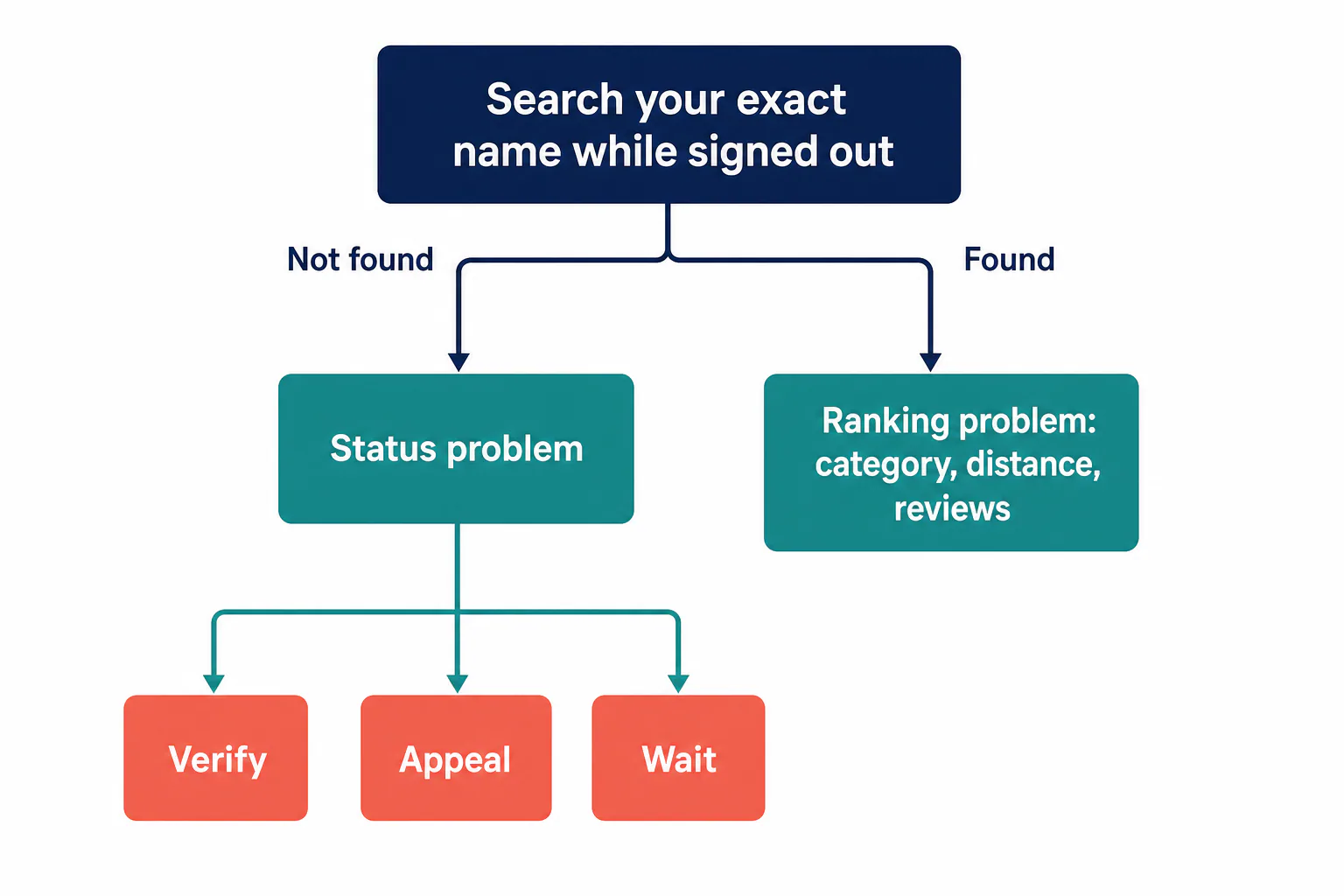
Not appearing anywhere, even by exact name
This is a status problem. The profile is unverified, suspended, or missing basic requirements like a category, hours and a real location. Google Maps displays only complete, live profiles. Careful category selection is part of that, so pay attention when selecting your main category.
Visible only when you are logged in
You see the profile because you own it. The public doesn’t. Usually verification is unfinished or an edit is on hold, so your business profile stays invisible to customers. Check your account settings for any notice.
Visible by name but not for searches like “plumber near me”
Good news: you exist. Category, distance and ratings decide who appears for generic searches, so this is a ranking problem. Ranking problems are where Google Maps SEO for small businesses comes in, from categories and reviews to local relevance.
How to test each one in two minutes
Run these checks in order:
- Sign out, or open a private browser window.
- Search your name exactly as your business appears on the profile, plus your city.
- Search your service alone, like “roof repair.”
- Ask a friend across town to repeat both searches.
If the name search fails, you have a status problem. If the name works but the service search fails, it’s relevance or distance. Check your spelling and city first, because one wrong letter can make a live listing look missing.
Unverified, Suspended or Still Processing: How to Tell the Difference
Your dashboard usually tells you which one you have. Sign in with the account you used when creating the profile, and confirm your business details are accurate there.
Signs of an unverified profile and how to finish verification
You’ll see a “Get verified” prompt. Google offers video, postcard, phone or email verification. If you’re selecting video, show your sign, the street and your tools in one take. Waiting on a postcard? Don’t request another.
Signs of a suspended or disabled listing
A banner says the profile is suspended or disabled, usually with an email notice. Your listing and its ratings disappear from public view. Use the contact option in the notice to ask what went wrong.
Signs of a processing delay after edits
You’re verified with no warnings, but your edits say “under review.” The old version may stay up or drop out briefly. Location and primary category edits clear slowest, so don’t change them again or touch settings mid-review.
A decision rule: when to wait and when to escalate
Match what you see to the action:
- Verified, edits pending: wait, and stop editing.
- Unverified: finish verification now.
- Suspended: stop editing and prepare an appeal.
- Pending far longer than past edits: escalate to support.
Confirm, too, that you’re in the correct account. Owners who end up managing the listing from an old Gmail miss every notice.
Fix a Suspended Listing and Win the Reinstatement Appeal
A suspended listing stops appearing on Maps until it’s reinstated, so fix the cause before you file.
Policy violations that most often trigger suspensions
These are the usual suspects:
- Extra keywords in your name (“Joe’s Plumbing Best Plumber San Diego”)
- A location you don’t actually operate from
- A visible street address that customers never visit
- Two listings for one company
- Fake or paid-for reviews
Virtual offices, P.O. Boxes and hidden addresses: the trade-off with visibility
Google wants a real place staffed during your hours, or a service area. A virtual office or P.O. Box is a suspension trigger. Working from home? Set up as a service area business and hide your address. You lose some visibility, but that beats a suspension.
What to gather before you submit an appeal
Collect proof that you’re real and consistent:
- A business license with your exact name and address
- A utility bill or lease for that location
- Photos of your sign and workspace
- A website that shows the same name, phone number and contact info you gave Google, all accurate
Finish updating whatever broke the rules, then file Google’s reinstatement form. Keep it relevant: what was wrong, what you fixed and accurate proof.
Fix Duplicates, Mismatched Details and Wrong Categories
Google trusts business details that match everywhere. When your name, address and phone (NAP) differ across your business listing, website and directories, it has to guess which version is right. Updating them all to one accurate version fixes most of it.
Worked example: merging a duplicate listing with a mismatched phone number
Here’s an illustrative case. A Clairemont pet groomer moves and gets a new number. Signed out, she finds two results on Maps: her verified profile and an old business listing with the previous number. Maps displays both as separate shops. This is how she fixes it:
- She taps “Suggest an edit” on the old one and reports it as a duplicate.
- If it appears in her own account, she requests removal there.
- She updates her website, Yelp and Facebook so every listing is consistent.
- She searches again, signed out, until only one result remains.
One listing now collects every click, and her online presence tells one story.
Choosing a primary and secondary category that match what customers search
Your primary category does the heavy lifting, so category selection matters here. “Plumber” matches “plumber near me,” but “Contractor” doesn’t. Add secondary categories only for real side services, because a dozen loosely related ones blur your relevance.
Why verification fails and what to double-check
Before you retry, check the verification requirements and that every detail is correct:
- Your name matches your sign and license.
- The address includes your suite number.
- Your phone actually gets answered, and you can contact the number yourself.
- No other verified listing claims the same spot.
Check Your Real Visibility with a Rank Grid, Not One Search
One search from your desk tells you almost nothing, because proximity weighs heavily in local results.
Why your profile can look fine from your office and vanish across town
Google tailors local searches to where the searcher is standing. From your office you’re the closest match, but a customer across town might see five competitors and never see you.

How to read a grid of points around your business
A rank grid tool runs one search from points around your location and displays your rank at each one, an accurate picture of real visibility. Start by selecting a real customer search, like “emergency plumber,” then read the pattern:
- Strong near the pin, weak farther out: this is normal. Build ratings and content.
- Weak even at the pin: recheck your category.
- Strong in one direction only: competitors cluster there, or your service area settings are too narrow.
When your website and local advertising help close the gap
Your website adds relevance and online presence the profile can’t earn alone. Local San Diego Painting made the top 3 with 2 blog posts a month for a year. For red zones, try Google Ads campaigns and NextDoor business advertising San Diego.
Why Is My Business Not Showing Up on Google Maps After a Fix? Timelines and Next Steps
How long approval and edits usually take
There’s no fixed timeline. If you still ask why is my business not showing up on Google Maps after a fix, it depends on the step. Name searches recover first, ranking after category or location changes last. Leave your settings alone while edits stay “under review.”
Signs it is time to get help
Bring in help if any of these sound familiar:
- Your appeal was denied and you don’t know why.
- Verification keeps failing after every fix.
- Your grid stays red after you’ve fixed your category.
- You’re managing listings instead of running your shop.
Our Google Business Listing expert service covers setup and optimization. Our SEO Marketing plan includes Google Business setup and maintenance plus placement in local directories. We explain all of it in plain language.
Frequently Asked Questions
Why is my Google Business Profile only visible to me?
Why is my Google Business Profile only visible to me?
You’re signed in as the owner, so you see the profile even when the public can’t. The usual causes are unfinished verification, an edit under review or a suspension. Search your name in a private window. If it’s missing there, look for a “Get verified” prompt or a warning in your dashboard.
Why won’t Google verify my business?
Why won’t Google verify my business?
Usually something doesn’t match. Your name or location may differ from your sign, license or website, a suite number may be missing, or your video may have skipped the street or the proof that you work there. Make everything correct and identical, then retry with the method you’re offered.
How long does Google take to approve a Google Business Profile?
How long does Google take to approve a Google Business Profile?
There’s no fixed answer. New profiles can go live soon after verification, while video reviews, location edits and appeals take longer. If something sits pending well past the time your earlier edits took, and nothing shows in your dashboard, reach out to support rather than resubmitting.
How do I change my business category on Google?
How do I change my business category on Google?
Sign in, open your profile, choose Edit profile, then Business category. Set the primary one to what customers search for, and add secondary categories for real side services. A new primary category gets a closer review, so pick it carefully and leave it alone afterward.
How do you have your business appear on Google Maps?
How do you have your business appear on Google Maps?
Start by creating a profile with your exact name, a real location or service area and the right category, then verify it. After that, add photos, collect reviews and keep your website’s details matching. Appearing for your name happens quickly, but ranking in local searches takes ongoing work.