

Google Maps SEO for small business comes down to three things Google weighs in every local search: how well your listing matches, how close you are, and how well known you are. You can’t move your shop, but you can improve the other two.
When someone nearby searches for what you sell, the three businesses in the map box get most of the calls. We show how Google picks them, what you can change, and the order to work in when you have a couple of hours a week.
How Google Maps Decides Who Shows Up First
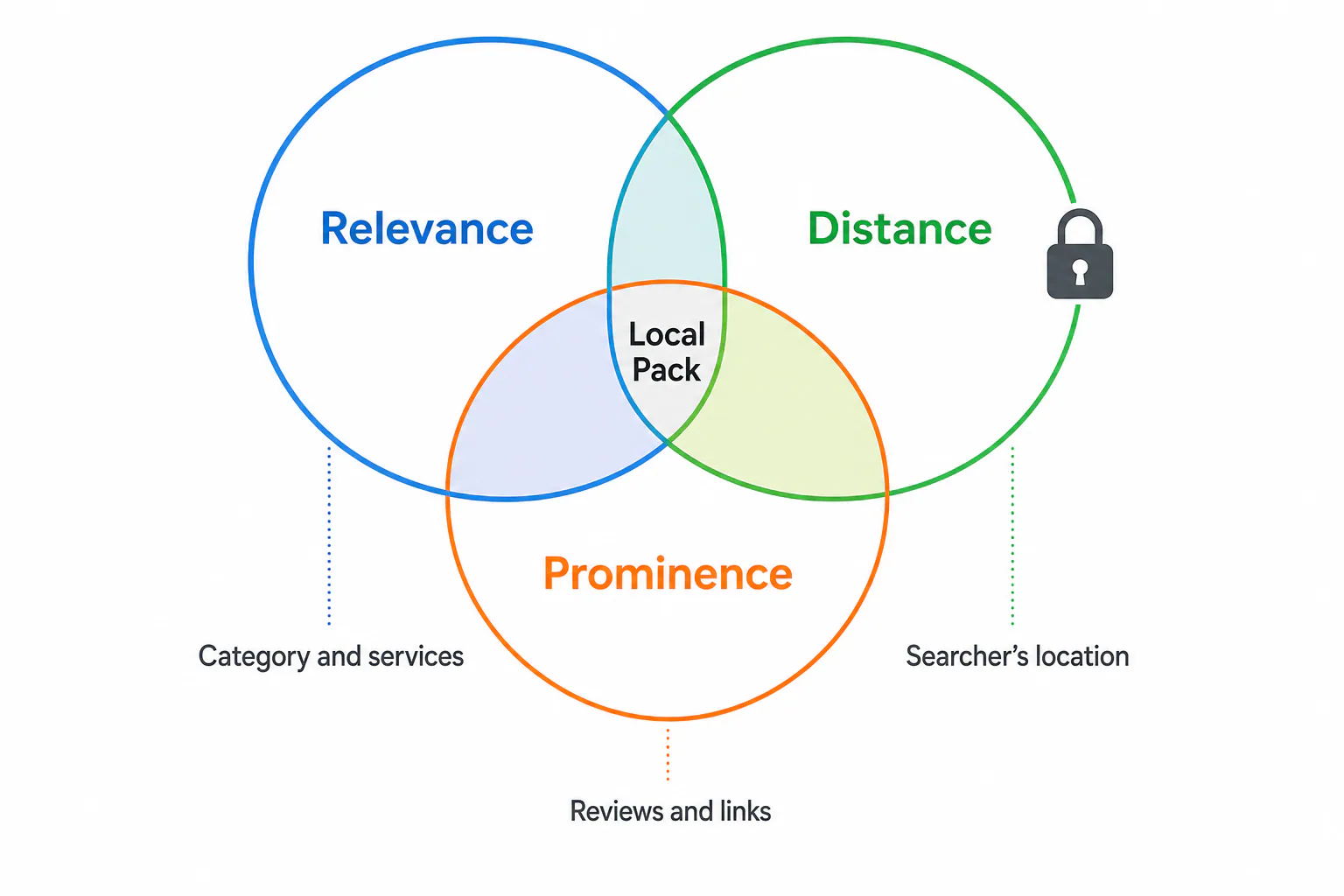
Google ranks local results on three factors: relevance, distance and prominence. The Whitespark Local Search Ranking Factors survey groups its findings around the same ideas. Google Maps SEO for small business starts with the factors you control.
Relevance: how well your profile matches the search
Relevance is how closely your profile matches the words someone typed. Your primary category is the strongest signal here. Your services list, your description and the words customers use in their reviews come next.
Say someone searches “water heater repair.” One plumber lists water heater repair as a service and has reviews that mention fixing water heaters. Another has a bare “Plumber” category and nothing else. The first one looks like a much better match. Same trade, very different fit.
Distance: where the searcher is, and what you cannot change
Distance is how far you are from the searcher, or from the place named in the search, like “dentist in La Mesa.” On mobile, Google uses the searcher’s location, which is why “near me” results change street by street.
This is the one factor you can’t change. A shop in Chula Vista usually won’t top a search done in Escondido, however good its listing is. Don’t fake it with a virtual office or a borrowed location. Google treats that as a guideline violation and can suspend the profile.
Prominence: reviews, links and how well known you are
Prominence is how well known Google thinks you are. It judges that from your number of Google reviews and your rating, links from other sites to your website, mentions in local news and directories, and how much activity your profile shows.
Picture a taqueria that a neighborhood blog wrote about, with new reviews every week and a website other local sites link to. It sends stronger signals than a taqueria that only exists on Maps. Prominence builds slowly, but it’s the factor where your effort shows the most.
Google Maps SEO vs. local SEO vs. organic SEO
Google Maps SEO is one slice of local SEO, and local SEO overlaps with regular organic SEO. Here’s how the three compare:
| Type | What you work on | Where you show up |
|---|---|---|
| Google Maps SEO | Your profile, reviews, photos, categories, posts | Google Maps and the Local Pack (the map box on the results page) |
| Local SEO | The profile plus citations, local website pages and local links | Maps, the Local Pack and local organic results |
| Organic SEO | Website content, technical health and links | The regular blue links, for local and non-local searches |
For a business that serves people nearby, the Maps work usually brings the fastest gains. The website work supports it over time.
Google Maps SEO for Small Business: The Short List
To rank higher on Google Maps, do the basics in a fixed order: verify, categorize, complete, clean up, then build reviews and activity. The order matters because a later step can’t make up for a skipped earlier one.
The eight actions in priority order
Here’s how to rank your business higher on Google Maps, starting with what pays off fastest:
- Claim and verify your Google Business Profile.
- Choose the most specific primary category for your main service.
- Fill in every field: services, description, hours, attributes, booking link.
- Make your name, address and phone match everywhere online.
- Ask every happy customer for a review, and reply to all of them.
- Add real photos of your place, team and work, and keep adding them.
- Back up the listing with a fast, mobile-friendly website with a page for each service.
- Publish posts and keep the profile active every week.
Steps one to four are mostly one-time work. Steps five, six and eight never stop, and that ongoing activity is what separates the listings that hold their spot from the ones that slip.
What to do first if you only have two hours a week
Spend your first two weeks on steps one to three. After that, use this decision rule:
- If your category or services don’t match what people search, fix that before anything else. Nothing helps a mismatched listing.
- If the three listings ahead of you have far more reviews, put most of your weekly time into reviews.
- If you’ve moved or changed numbers in the past, clean up your old listings before you chase reviews.
A simple weekly rhythm works for most one-person shops. Spend 30 minutes on reviews and replies, 20 minutes on photos and one post, and the rest on one bigger job. Google Maps SEO for small business pays off over months, not days.
Claim and Verify Your Google Business Profile
Claiming and verifying your Google Business Profile (GBP) is free, and every other step depends on it. Until Google verifies you, many edits stay pending and the listing won’t rank the way it should.
How to claim your profile for free
- Go to business.google.com and sign in with an account you own. Use a business email you control, not an employee’s personal account.
- Search for your business name. If it already shows up, choose to claim it. If it doesn’t, create a new profile.
- Enter your exact name, primary category, address or service area, phone number and website.
- Pick a verification method. Google offers what it can for your type of business, such as a text code, an email or a video recording.
- Finish verification, then come back and fill in the rest of the profile.
Common verification snags and how to get past them
- Someone else already owns it. A former employee or an old marketing company may have claimed it. Use the request access option on the profile and follow Google’s prompts if they don’t answer.
- Video verification fails. Google wants one unbroken clip that shows your location or work vehicle, the tools of your trade, and proof you run the business, like signage or paperwork. Plan the shot before you hit record.
- Your details don’t match. The address on your profile, your signage and your documents should agree, down to the suite number. PO boxes and virtual offices don’t qualify.
- Edits during review. Changing your name, category or location while verification is pending can restart the process. Wait until it’s done.
Service area business Google Business Profile: hiding your address and setting your areas
If you go to your customers instead of having them come to you, set up as a service area business. Plumbers, painters, mobile groomers and house cleaners usually fit here.
In your GBP, clear the public address, then add the areas you serve by city or ZIP code. A Mira Mesa pest control company might list Mira Mesa, Poway and Rancho Bernardo, not all of San Diego County.
Fill In Every Profile Field the Way Google Reads It
A complete profile gives Google more to match against searches and gives customers fewer reasons to pick someone else. Most of this optimization is free and takes an afternoon. Fill in every field that applies, using the words your customers actually use.
Primary and secondary categories
Your primary category is the strongest relevance signal on the whole profile, so pick the most specific one that describes your main work. “Mexican restaurant” beats “Restaurant.” “Roofing contractor” beats “Contractor.”
Secondary categories cover other work you really do. A roofer who also installs gutters can add a gutter category. Check the categories of the top three listings for your main search. Skip categories for work you don’t offer.
Business name, description and services without keyword stuffing
Your business name on Google should match your sign, your website and your paperwork exactly. Adding keywords, like “Sunset Plumbing | Best Plumber San Diego,” breaks Google’s guidelines and is one of the quickest ways to get suspended. Competitors can report it too.
The description is where you speak plainly: what you do, who you do it for and where. Then list each job in the services section, so “drain cleaning” and “sewer line repair” are two entries, not one.
Hours, attributes, products and booking links
- Hours: set regular hours and add special hours for holidays. Wrong hours lead to angry reviews fast.
- Attributes: tick the ones that are true, like wheelchair accessible, online estimates, or veteran-owned.
- Products: retail shops can show products with photos and prices.
- Booking and website links: add your appointment link if you take bookings online, and point the website link to the page that best matches your main service.
Photos and video that earn clicks and calls
Real photos are one of the main reasons people click, call or ask for directions, and they show Google the business is real and active. Stock photos do the opposite. Start with photos that answer what a new customer wonders:
- The outside of your building or your work van, so people recognize you on arrival
- The inside, shot from the door
- You and your team at work
- Finished jobs or your best-selling products
- A short video walk-through or a before-and-after clip
After that, add a few new photos every month. Fresh photos keep the profile looking current, and they only cost you a minute.

Keep Your Name, Address and Phone Consistent Across the Web
Your business name, address and phone number should read the same on every site that lists you. When Google finds different versions, it’s less sure which one is right, and customers end up calling a dead number.
What NAP is and why conflicts hurt trust
NAP stands for name, address and phone. Google compares your profile with what other sites say about you, and matching details build trust. Conflicts chip away at that trust, like an old location on Yelp or a former number on a directory.
Pick one consistent format and stick to it. If your profile says “Suite 200,” don’t write “#200” elsewhere. Small differences won’t sink you, but a wrong phone number or an old street address will cost you customers.
Which citations are worth your time
A citation is any mention of your business details on another site. You don’t need hundreds. Focus on the ones customers actually use and the ones in your trade:
- Apple Business Connect (for Apple Maps) and Bing Places
- Yelp, Facebook and Nextdoor
- The Better Business Bureau and your local chamber of commerce
- Industry directories, like Houzz for remodelers, Avvo for lawyers or Healthgrades for medical practices
Skip the packages that push your listing onto hundreds of directories nobody visits. They add little and create more places for your details to go stale.
How to find and fix old or duplicate listings
- Search Google for your current number in quotes. Then search for any old numbers and old addresses you’ve used.
- Do the same with past business names if you’ve ever renamed.
- Log in to each listing you find and correct it. If you can’t log in, use the site’s claim or support option.
- On Google Maps, look for duplicate listings of your business. Use “Suggest an edit” to report the duplicate, or ask Google Business Profile support to merge or remove it. Either route works.
Keep a simple spreadsheet of every listing, its login and the date you last checked it. That turns a messy job into a quick, consistent check every quarter.
Reviews, Replies and Q&A: Building Prominence the Honest Way
Reviews are the biggest prominence signal most small businesses can actually move, and they’re what searchers read before they call. Volume, recency and your replies all feed your visibility.
How many reviews you need compared with the businesses ahead of you
There’s no magic number. What matters is how you compare with the businesses already ranking at the top for your main search. Look them up and note how many Google reviews each has and how recent the newest ones are. That’s your benchmark.
If the leaders have a few hundred reviews and you have a dozen, you won’t close the gap in a month. A steady stream of new reviews shows you’re busy right now. Thirty reviews in one week, then silence, looks less healthy.
Ways to ask for more Google reviews without breaking the rules
- Ask in person at the happy moment, when the job is done and the customer says thanks.
- Text or email your review link the same day. Your Business Profile has a share option labeled “Ask for reviews.”
- Put a QR code with that link on receipts, invoices or a counter card.
- Invite detail: “If you can, mention what we did for you.” Reviews that name the service help relevance.
Don’t offer discounts or gifts for reviews, buy them, have family post them, or send the link only to people you think are happy. That breaks Google’s rules, and Google removes fake reviews and can restrict profiles that collect them.

Replying to every review, including the bad ones
Respond to every review, good and bad, within a few days if you can. A short, personal thank-you to a five-star review shows that someone is paying attention. Mention the job naturally, like “Glad the new water heater is working well,” not a string of keywords.
For a bad review, stay calm and respond briefly. Thank them, own what went wrong, and offer to sort it out offline. Never argue in public. A fair answer often wins more trust than a perfect score.
Answering the questions on your public listing
Where your listing shows a questions section, anyone can ask and anyone can answer, including strangers who guess wrong. Check it regularly and respond from your own business account.
You can also add questions you hear on every call, like “Do you offer free estimates?”, and answer them yourself. If you don’t see the feature on your profile, put those answers in your description and on your website.
Your Website and Posts: The Support Signals Behind Your Listing
Your website and your Google Posts don’t replace the profile, but they back it up. They give Google more signals about what you do and where you do it, which builds your local search visibility over time.
What your website needs so it backs up your profile
- A page for each main service, with the service and city in the heading
- Your NAP in the footer, consistent with the profile
- A contact page with an embedded map and a click-to-call number
- Fast loading and easy reading on mobile, since that’s where many local searches start
- Real reviews and photos of real jobs, which add trust
Then set your GBP website field to the page matching your main category. Local San Diego Painting consistently makes the top 3 with 2 blog posts per month. Our blog writing and SEO content service covers that kind of steady writing.
Google Posts and regular profile activity
Google Posts are short updates that appear on your profile: an offer, a new service, an event, a finished project. They won’t rank you on their own, but regular activity shows Google and customers that you’re open and busy.
Aim for about one post a week, with a real photo, two sentences and a button like “Call.” A Carlsbad pool service might post a before-and-after of a green pool turned clear. Posts, photos and replies add up to activity signals that support local search visibility.
A Before-and-After Example of a Small Business Profile
The example below is illustrative, not a real client. It shows how the steps above fit together for one small business.
The starting point: category, description, photos and reviews
Picture a two-person house cleaning company in Clairemont. Its profile looks like this:
- Category: the generic “Cleaning service,” with no secondary categories
- Description: “Best cleaners in San Diego! Call now!!” and nothing else
- Location: the owner’s home address, showing publicly
- Photos: three dark snapshots and a logo
- Reviews: nine total, the newest eight months old, none with a reply
- Elsewhere: Yelp still shows a number the owner stopped using
The changes, in the order they were made
- Verify the profile on an account the owner controls. Then switch to a service area setup, hide the home location and list the neighborhoods they really cover.
- Change the primary category to “House cleaning service” and add secondary categories only for work they do.
- Rewrite the description in plain words and list each service separately: standard cleaning, deep cleaning, move-out cleaning.
- Fix the old number on Yelp. Check the other main directories too.
- Respond to all nine old reviews, then text the review link after every job.
- Add photos from real jobs each week: before-and-after kitchens, the team, the supplies they bring.
- Build a website page for each service and each main area, then publish one Google Post a week.
What to expect and what no one can promise
In a case like this, the first changes usually show up in the profile’s own numbers before rankings move: more views, a few more calls, more website clicks. Rankings tend to improve first close to the business’s base and spread outward as reviews and activity build.
What no one can promise is a spot in the top three. Distance still limits how far the listing reaches, and competitors keep working too. Anyone who guarantees a ranking is selling something Google doesn’t let them control.
How Long Google Maps SEO Takes and How to Measure Progress
Most small businesses see early movement from Google Maps SEO within weeks of fixing their profile, and bigger, steadier gains over several months of reviews and activity. How fast it goes depends on where you start and how crowded your search is.
Realistic timelines for new, unverified and established listings
- Unverified listing: don’t expect real ranking movement until verification is done. Many edits won’t even go live before then.
- New, verified listing: it often starts to appear for searches of your exact name fairly quickly. Showing up for “plumber near me” in a busy area usually takes months of reviews and activity.
- Established listing with gaps: fixing the category, services and NAP can show results within a few weeks. Closing a big review gap takes longer, because it moves at the pace of your customers.
Seasonal trades feel this most. An AC company that starts in spring is building for summer, not for next week.
Checking your rank by location with a local grid tracker
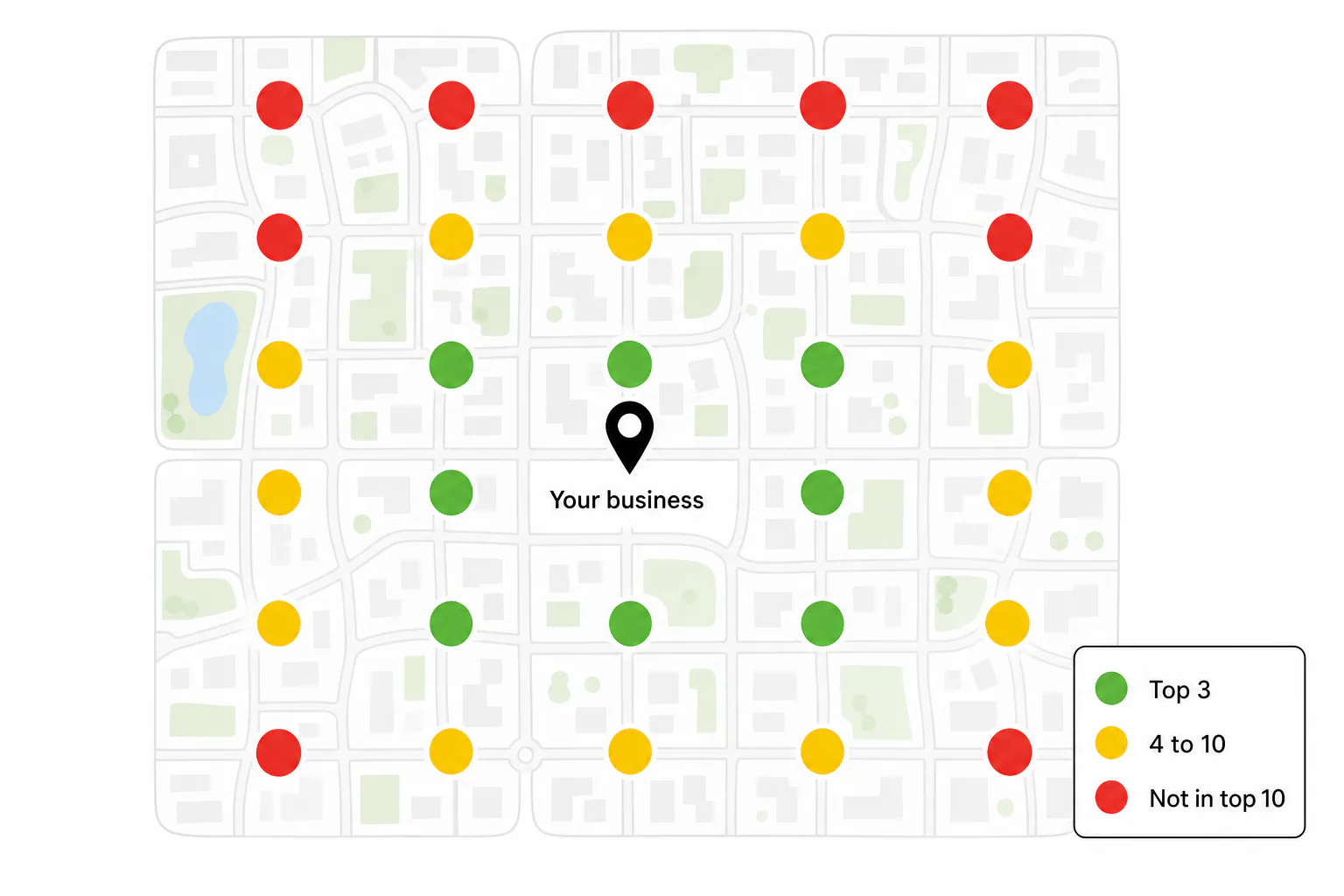
Searching your own keyword from your shop won’t tell you much. Results change with where you’re standing, and Google personalizes them. A local grid tracker fixes that.
Tools like Local Falcon, BrightLocal and Whitespark run the same search from a grid of points around your business and show your ranking at each spot. You’ll see where you appear in the top three. Use the same keyword and grid size each month.
Numbers worth watching in your Business Profile performance data
Your profile has a Performance section with free numbers worth checking once a month:
- Searches: the terms people used to find you. Terms you don’t see there point to services to add.
- Views: how often your profile appeared on Maps and in Search.
- Calls, direction requests and website clicks: the actions that turn into money.
- Bookings and messages, if you’ve turned them on.
Watch trends over three months, not one. If views rise but calls don’t, the content on your profile (photos, reviews, description) needs work.
Do It Yourself, Use Tools, or Hire Help? Costs Compared
Google Maps SEO for small business can cost nothing but your time, or a monthly fee for tools or an agency. The right choice depends on how much time you have and how crowded your local market is. Here’s how the three routes compare:
| Route | What it costs | What you get | Best if |
|---|---|---|---|
| Do it yourself | Free, plus your time | Profile setup, reviews, photos, posts, basic NAP fixes | You have a few hours a week and few competitors |
| Paid tools | Monthly subscription | Grid tracking, citation audits, automated review requests | You’ll do the work but want data and shortcuts |
| Agency | Monthly fee | Someone does the work, often with website and content support | Your hours are worth more on the job than on the profile |
What the free DIY route covers and where it runs out
The free route covers more than most owners think. The GBP itself, verification, posts, photos, replies, and listings on Apple Business Connect and Bing Places all cost nothing. A motivated owner can get the profile into solid shape over a few weekends.
DIY runs out at measuring rank across your area, cleaning up citations at scale, and building the website pages and links that strengthen prominence signals. The real cost isn’t money. It’s the hours spent learning optimization tools when you’d rather be working.
What paid tools and agencies add
Paid tools mostly save time and show you data. A grid tracker shows where you appear, a citation tool finds stale listings, and review software sends the ask for you. You still do the thinking and the work.
An agency does the work for you. Before you hire one, ask exactly what they’ll do each month, who owns your GBP login (it should be you), and how they’ll report progress. Walk away from anyone who guarantees a ranking.
Local SEO help for San Diego businesses and beyond, with SEO Marketing from $159+ per month
If you’re looking for Google Business Profile management in San Diego or anywhere else, this is what we do. Websites San Diego is a digital marketing, SEO and web design agency with 30 years of experience helping businesses succeed online. We explain everything in plain language.
Our SEO Marketing plan is a monthly service with onsite SEO, geomarketing, Google Business setup and maintenance, local directory placement and white hat techniques. For profile setup only, our Google Business Listing expert service covers setup and optimization.
We work on Google Maps ranking in San Diego and for businesses well beyond it. SEO results vary, so we won’t promise you a spot. We’ll show you what we’re doing and how your numbers move.
Turning Map Views into Customers
Ranking only matters if people take the next step. To get more customers from Google Maps, make calling, finding you and booking as easy as possible.
Making your listing convert: calls, directions and booking
- Answer the phone during the hours on your profile. A missed call from Maps usually means the searcher tries the next listing.
- Check that your pin sits in the right spot and the directions lead to your door or parking, not the back alley.
- Add a booking link if customers can schedule online, so they can book at 10 p.m. without calling.
- Pick a strong cover photo. It’s the first impression in the map results.
- Turn on messages only if someone will respond quickly.
Using Google Maps marketing alongside the rest of your marketing
Google Maps marketing works best when the rest of your marketing points back to it. Put your review link in follow-up emails, add your profile to your social pages, and make sure your website and your listing tell the same story.
If you need calls while your organic rankings build, paid ads can fill the gap. Search ads with your location attached can appear above the map, and we run Google Ads and social media campaigns for that. For home services, Nextdoor is worth a look too.
Your next step: open your profile today, check your verification status and primary category, and send your review link to your last three happy customers. If you’d rather have us take it from there, reach out below.
Frequently Asked Questions
How long does it take to see results from Google Maps SEO?
How long does it take to see results from Google Maps SEO?
Early changes often show within a few weeks of fixing your category, services and NAP, especially for searches close to your location. Wider, steadier gains usually take several months of new reviews, photos and posts. A brand-new listing moves slower than an established one, and a crowded search like “dentist near me” moves slower than a niche one. Measure monthly with a grid tracker and your Performance data.
Does Google Maps SEO cost money?
Does Google Maps SEO cost money?
It doesn’t have to. Claiming and verifying your Google Business Profile, adding photos, posts and replies, and listing on Apple Maps and Bing are all free. You pay with your time. Money comes in when you want tools for grid tracking or citation cleanup, or an agency to do the work. Our SEO Marketing plan, for example, starts at $159 a month.
Do reviews affect Google Maps ranking?
Do reviews affect Google Maps ranking?
Yes. Reviews are a major prominence signal, and Google looks at how many you have, how recent they are and your overall rating. The words customers use can help relevance too, for example when a review names the service someone searched for. Reviews also drive the click, because people compare stars and read the latest few before they call. Ask for genuine reviews only.
Does a website help my Google Maps ranking?
Does a website help my Google Maps ranking?
Yes, indirectly. A good website gives Google more proof of what you do and where, through service pages, matching NAP and links from other local sites. It also helps the people who click through before they call. A listing without a website can still rank, but in competitive searches the businesses ahead of you often have solid sites behind them.
Is SEO still worth it in the age of AI search?
Is SEO still worth it in the age of AI search?
Yes. AI answers can draw on the same things that help you on Maps: your Google Business Profile, your reviews and your website. And someone looking for a local service still wants a number to call, directions and honest reviews, which is exactly what your listing gives them. A clear, accurate, well-reviewed profile helps wherever the search happens.