

If your website is not showing up on Google, either Google hasn’t indexed it yet (it’s new, or a setting blocks it), or it’s indexed but not ranking because Google doesn’t trust it enough yet. Diagnose first, change things second.
Here’s how to get your website to show up on Google, in the order we’d do it:
- Search site:yourdomain.com to see whether Google has indexed anything.
- Set up Google Search Console and verify your site.
- Read the Pages report to see why pages aren’t indexed.
- Remove any noindex tag, “discourage search engines” box or robots.txt block.
- Submit your XML sitemap and request indexing for your homepage.
- If you’re indexed but buried, work on content, trust and your Google Business Profile.
Run the Two-Minute Check First: Is Your Site Indexed or Just Not Ranking?
The fastest way to learn why your website is not showing up on Google starts with the site: search. It shows you the pages Google has stored, and it takes under a minute. Every next step depends on what it returns.
How to Use the site: Search and Read the Result
Open Google and type site:yourdomain.com, with no space after the colon and no “https://” or “www”. A list of your pages means Google knows your site. “Your search did not match any documents” means none are indexed yet. The count is rough, so a few pages off is fine.
Decision Tree: Which Branch Are You On?
Match your result to a row below and jump to the section it points to.
| What the site: search shows | What it likely means | Your next step |
|---|---|---|
| Zero results | Not indexed: brand new, or blocked | Check settings, then set up Search Console |
| Homepage only, or a handful of pages | Partly indexed: Google found you but hasn’t crawled everything | Submit a sitemap, read the Pages report |
| Old pages from before a redesign | Google hasn’t recrawled the new site | Submit the new sitemap, check redirects |
| All your pages, but you can’t find them for searches like “roofer San Diego” | Indexed, not ranking | Work on content, trust and your Google Business Profile |
Why a Missing Site Is Not Proof of a Penalty
An empty site: result almost always means Google hasn’t indexed you yet, not that you’re being punished. Penalties come from spam tactics like bought links or copied pages. Check the boring causes first, because they’re the usual ones.
Set Up Google Search Console and Read the Pages Report
Google Search Console is the free, official tool that tells you exactly why a page isn’t indexed. Every fix below is easier with it, so set it up before you touch anything else.
Verify Your Site in Search Console
Go to search.google.com/search-console and sign in with a Google account you’ll keep. A Domain property covers every version of your site (www, non-www, http, https) and is verified with a TXT record at your domain registrar. A URL prefix property covers one exact address and verifies with an HTML tag, a file upload or Google Analytics. If you can log in to your registrar, choose Domain. Otherwise URL prefix works fine.
Once you’re verified, open Indexing > Pages and scroll to “Why pages aren’t indexed.” Two statuses confuse almost everyone.
What “Discovered, Currently Not Indexed” Means
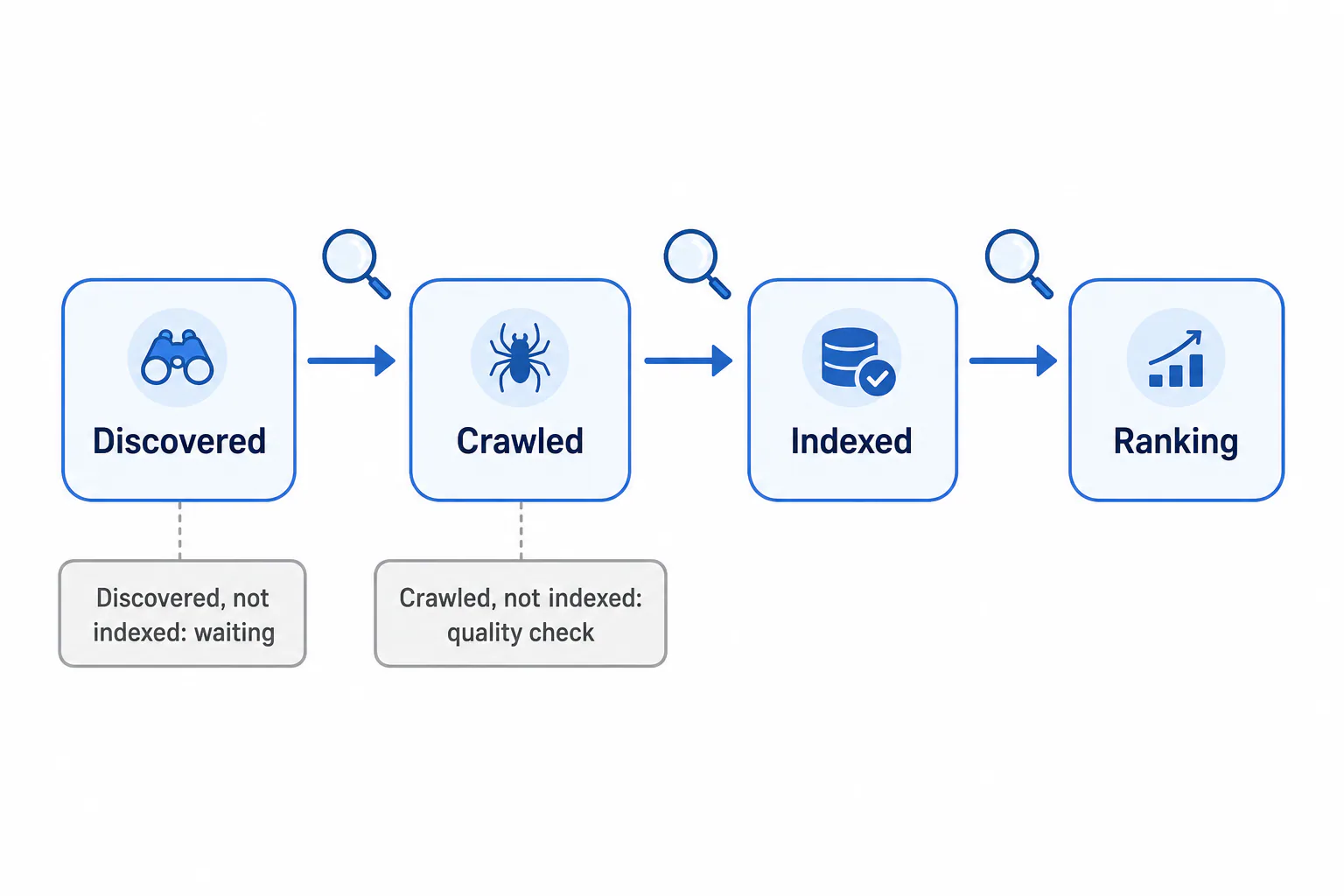
Google knows the page exists but hasn’t crawled it yet. Googlebot put it on a to-do list and moved on. This is very common on new sites with few links pointing to them. Usually the fix is patience plus a few internal links from your homepage to that page.
What “Crawled, Currently Not Indexed” Means
Google visited the page and decided not to store it, at least for now. That’s more of a quality signal. Thin pages, near-duplicates (five city pages with the same text) and placeholder pages often land here. Improve the page before you ask again.
Two more causes land pages here. Empty or near-empty pages can be treated as soft 404s and dropped from the index, so add real content or remove them. A redirect chain, where an old address hops through several others, can also stop a page being indexed, so point old URLs straight at the final address.
Test a Single Page with the URL Inspection Tool
Paste any page address into the search bar at the top of Search Console. You’ll see “URL is on Google” or “URL is not on Google,” plus the reason. Click Test Live URL to confirm your fix worked, then click Request Indexing. Use it for your key pages only, not all fifty.
Your Site Is New or Redesigned: How Long Google Really Takes
A new website usually takes anywhere from a few days to a few weeks to appear on Google, and sometimes longer. Nobody, Google included, can promise a date. What you can control is how easy you make it for Google to find you. A site that vanishes after a plugin or theme update may have picked up a noindex tag, so recheck your settings.
Realistic Timelines for a New Domain, a Redesign and a Fixed Noindex
- Brand-new domain: slowest. Google has no history with you and no links leading to you, so the first crawl can take a while, and ranking for competitive local searches takes much longer than indexing.
- Redesign on the same domain: usually faster, because Google already visits. The risk is changed page addresses. Old URLs that now show “page not found” can drop out, so redirect old addresses straight to the final new one, because a redirect chain of several hops can stop a page from being indexed.
- After removing a noindex: pages come back once Googlebot recrawls them. Requesting indexing on your main pages helps, but expect days rather than hours.
What Helps Google Find Your Pages Sooner (Sitemap and Request Indexing)
Submit your XML sitemap in Search Console under Indexing > Sitemaps. Most builders create one: WordPress at /wp-sitemap.xml (or /sitemap_index.xml if you use an SEO plugin), and Squarespace, Wix and most others at /sitemap.xml. Check it loads in your browser first. Then request indexing for your homepage and top service pages. Links from places Google already trusts, like your Google Business Profile or local directories, give Googlebot another path in.
Settings That Block Google Without You Knowing
A single setting can hide your whole site, and site builders often switch it on during the build. This is the most common reason a GoDaddy or Squarespace website isn’t showing up on Google: the “hide while we work on it” option never got switched off.
A Noindex Tag or the “Discourage Search Engines” Box
A noindex tag tells Google “don’t list this page.” It looks like <meta name="robots" content="noindex"> in the page code. You rarely add it by hand. A checkbox or an SEO plugin adds it for you. In Search Console it shows as “Excluded by ‘noindex’ tag.”
A Robots.txt Rule That Hides a Folder
Your robots.txt file lives at yourdomain.com/robots.txt. Open it in a browser. If you see Disallow: / under “User-agent: *”, you’re blocking every crawler from the whole site. A line like Disallow: /services/ hides just that folder. Developers sometimes leave these in from a staging copy. Search Console flags it as “Blocked by robots.txt.”
Platform Settings to Check in WordPress, Squarespace, Wix, GoDaddy and Google Sites
Here’s where the hidden switch lives on each builder.
| Platform | Where to look | What it should say |
|---|---|---|
| WordPress | Settings > Reading > Search engine visibility | “Discourage search engines” unchecked |
| Squarespace | Site availability, plus each page’s SEO tab | Site set to Public, not Private or password protected; “Hide from search results” off |
| Wix | SEO settings, and each page’s SEO basics | “Let search engines index your site” turned on |
| GoDaddy Website Builder | Publish status and connected domain, page SEO settings | Published to your real domain, not just the preview address |
| Google Sites | Publish settings | “Request public search engines to not display my site” unchecked |
If your developer built a custom site, ask them to check both robots.txt and the noindex tag before launch. Our website development plans include managed hosting and ongoing maintenance, which covers exactly this kind of check.
Why Is My Website Not Showing Up on Google When Indexed? Trust, Content and Manual Actions
If site: shows your pages but nobody can find you for the searches that matter, then why your website is not showing up on Google comes down to ranking, not indexing. Google has your pages and doesn’t yet think they’re the best answer.
Check the Manual Actions Report
Rule out the rare serious case first. In Search Console, open Security & Manual Actions > Manual actions. “No issues detected” is what most small business owners see. If there is an action, the report names the problem (unnatural links, spammy content); fix it and file a reconsideration request from the same screen.
Thin Content and Pages That Don’t Match What People Search
A homepage that says “Quality service since 2010” and a phone number gives Google nothing to match, which is a search intent mismatch. Compare it with a page that names your service, your city, what’s included and what customers ask. Search your main service plus your city, see what ranks, and ask whether your page answers the same question better. One solid page per service beats one page that lists everything.
Few Backlinks and Low Trust: The Slow Fix
Backlinks are links from other websites to yours, and Google reads them as votes of trust. A new site has almost none. Start with honest ones: your Business Profile listing, local directories, your chamber of commerce and local partners. Skip anyone selling links in bulk, because that’s how manual actions happen. This takes months, not days.
When Ongoing SEO and Content Help
Steady, useful content builds trust over time. One example from our own work: Local San Diego Painting consistently makes the top 3 in the Google listings, with 2 blog posts per month for over a year. Results vary from business to business, and nobody can guarantee rankings. If you’d rather not run this yourself, our SEO marketing covers onsite SEO, geomarketing and placement in local directories using white hat techniques.
Website Missing vs. Business Listing Missing: Two Separate Problems
Your website and your Google Business Profile are two different things, and either one can go missing without the other. If your business isn’t showing up on Google Maps, fixing your website won’t bring it back.
Why Your Google Business Profile Can Vanish While Your Site Stays Listed
Your profile lives in its own system. It can drop off Maps because it was never verified, got suspended for an address problem or a keyword-stuffed business name, or had details edited that now need review. Your website can sit perfectly indexed meanwhile. The reverse happens too: a strong listing with a website blocked by noindex. This matters locally, since 70% of these searches are done on Google Maps. A verified, complete profile is the foundation of Google Maps SEO for small businesses that want to be found by nearby customers.
Where to Go Next for Map Listing Problems
Sign in to your Business Profile and look for a status message like “Suspended” or “Pending verification.” That tells you whether to verify, appeal or wait. If the profile looks fine but still doesn’t appear, the issue is local ranking, and our Google Business Listing service handles setup and optimization.
Run the site: search today and follow your branch from there. If you’d rather hand it to someone who’s spent 30 years helping businesses get SEEN online and who explains things in plain language, we’re happy to take a look.
Frequently Asked Questions
Why is Google not crawling my website?
Why is Google not crawling my website?
Usually Google simply hasn’t found it yet, because no other site links to it and no sitemap has been submitted. A robots.txt rule or a server that times out can also stop Googlebot. Check the Pages report and the Crawl stats under Settings in Search Console, submit your sitemap, and link to your site from your Google Business Profile.
Why can’t I see websites on Google?
Why can’t I see websites on Google?
If no websites show up at all, the problem is your connection, browser or a filter, not any one site. Try another browser or device and turn off extensions. If only your own site is missing while others show, it’s an indexing or ranking issue, and the site: search above tells you which.
Why is my website not popping up?
Why is my website not popping up?
“Not popping up” usually means you searched your service, like “dentist near me,” and didn’t see yourself. Search your exact business name too. If that finds you, you’re indexed but not ranking for broader searches yet. If it doesn’t, start with the site: check and the platform settings table.
Why is my website not showing up on Google Chrome?
Why is my website not showing up on Google Chrome?
Chrome is just a browser; the results come from Google Search, so they’re the same in any browser. If your site won’t load in Chrome, look at an expired SSL certificate, a domain that isn’t connected yet, or an old cached version. Try an incognito window. If it loads there, clear your cache.
Can I pay to get my site indexed faster?
Can I pay to get my site indexed faster?
No. Google doesn’t sell indexing, and paid “submission” services can’t do anything you can’t do free in Search Console. Google Ads can put an ad at the top of results right away, but ads don’t change your organic indexing or ranking. Fix the settings, submit your sitemap and request indexing instead.