

Hosting keeps your website online, and maintenance keeps it safe, current and working. When owners shop for website hosting and maintenance for small business sites, the classic mistake is paying for one and assuming they bought both. They find out the day an update breaks something or the domain quietly expires, and your online presence takes the hit.
Below we split the two jobs and list what maintenance really includes. We also give you a simple rule for what to do yourself and what to hand off, plus two sample budgets and a checklist you can pass to whoever looks after your site.
Hosting vs Maintenance: Two Different Jobs
Web hosting means renting space on a server so your site can be reached day and night. Website maintenance services are the ongoing work that keeps that site secure, fast and accurate. Think of the first as the lease on your storefront. Maintenance is the person who fixes the lock and changes the sign in the window.
What hosting covers
A host’s package gives you storage and bandwidth, which is how much data visitors can pull from your site each month. It also runs the server software behind your web application, usually WordPress. The host keeps the hardware running. If the server crashes, that’s the host’s job. A good host also keeps the web server software patched.
What maintenance covers
Maintenance is everything inside your site. That means regular updates, tested backups, security scans, speed optimization and fixing a contact form that stopped sending. If your site breaks because an add-on update clashed with your theme, that’s a maintenance problem. Most hosts will send you a help article and leave you to maintain the fix yourself.
Where the two overlap in bundles
Managed hosting packages blur the line. Many include automatic WordPress updates, daily backups and malware scanning, so it feels like maintenance is covered. It usually stops at the server. Nobody checks that your booking application still works, handles image optimization or edits your services page. Ask the provider to mark each feature “server” or “my site.”
What Website Maintenance Involves
Website maintenance involves five recurring jobs that keep a site safe and working:
- Updating WordPress core, plugins and themes
- Security, meaning the SSL certificate, malware scans and a firewall
- Off-site backups, tested by actually restoring one
- Uptime monitoring, speed checks and broken-link fixes
- Content updates and domain renewals
Software updates for WordPress core, plugins and themes
Your core system, theme and each add-on get regular updates, and many close security holes. Skipping them for months is a real risk. Back up first and update one piece at a time, never “update all” on a Friday. Then click through your homepage, contact form and checkout to maintain a working site.
After updates, check layout too. Open your menu, buttons and forms on a phone, and make sure the contact form and phone links still work. Confirm buttons have clear labels and forms have visible field names, so everyone can use them.
Security: SSL, malware scans and firewall
Security starts with an SSL certificate, the padlock that tells customers their form details are encrypted. Make sure it renews automatically. Add a weekly malware scan and a web application firewall. The cheapest protection costs nothing: strong passwords, two-factor login, and deleting old admin accounts.
Backups you can actually restore from
Keep backups off the server, or a hack takes them down too. Keep several dated versions, because malware can sit unnoticed for weeks. Twice a year, ask your provider to restore a backup to a test copy and time it. That drill tells you more than any feature list.
Uptime, speed and broken-link checks
Uptime monitoring pings your site every few minutes and emails you when it stops answering, so you hear about an outage before a customer does. Check performance on a phone, where many local customers will see you. A broken-link scan catches dead pages and menu links that point nowhere.
Content updates and domain renewals
Content goes stale fast: prices, staff photos, holiday hours. Keep your hours and phone number identical on your site and your Google Business Listing. Turn on auto-renew for your domain and keep the card current, since an expired domain can stop your site and email. Also review your privacy policy and cookie notice each year.

Choosing Hosting: Plan Types and the Fine Print
Pick the plan type first. Then read the renewal price and the limits, because that’s where cheap web hosting hides its real cost.
Shared, managed WordPress and other plan types in plain words
Here’s how the four plan types you’ll run into compare:
| Plan type | What it is | Good fit | Who handles server management |
|---|---|---|---|
| Shared | Your site shares one server with many others | A simple brochure site | The host |
| Managed WordPress | Hosting tuned for one content management system, with automatic updates and backups | Owners who want less hands-on work | The host, plus some site-level care |
| VPS | A private slice of a server with set resources | Growing stores or custom builds | You or your developer, unless it’s managed |
| Cloud | Resources spread across servers, scalable as traffic grows | Sites with traffic spikes | Varies by provider |
Bluehost, Hostinger and DreamHost show up on most shortlists. Check their current terms yourself instead of trusting an old roundup.
Intro prices vs renewal rates and plan limits
The low monthly price on a hosting homepage usually assumes you prepay a year or more, and renewal often costs noticeably more. “Free domain” frequently means the first 12 months only. Then check the limits:
- Storage and bandwidth, including any fair-use clause behind “unmetered”
- How many sites and email accounts you get
- How long backups are kept
- Whether you can use your own content management system
The downsides of cheap hosting and bundled maintenance
Cheap shared hosting puts you on a crowded server, where a busy neighbor can drag down web performance. Support often runs on scripts, and a restore may cost extra. Bundled care often means automatic updates nobody checks. And when one company holds everything, leaving can mean starting over.
Questions to ask before you buy
- What’s the renewal price after the intro term?
- Are backups stored off-site, and how far back do they go?
- Do security updates install automatically, and who fixes a broken one?
- What happens if I go over my storage or bandwidth?
- Can I export my whole site for free if I leave?
Website Hosting and Maintenance for Small Business: A Decision Rule
Here’s the rule for website hosting and maintenance for small business owners. A managed host’s built-in care is enough for a simple site that rarely changes, if you check it monthly. Separate maintenance makes sense once the site takes orders, bookings or runs custom features. Do you need an agency? Only when downtime would cost you real money.
When a host’s built-in care is enough
Picture a 5-page site for a handyman: a standard theme, a handful of plugins and a contact form. Managed hosting covers regular updates, backups and malware scans. Your part is a quick monthly look at the homepage and the form.
When you need an agency or retainer
Bring in help when customers rely on a store or booking system. A retainer also pays off for performance optimization tied to SEO, or a scalable setup before a busy season. You’re paying for judgment: someone who tests updates and knows your site.
Can you maintain your website yourself?
Yes. Plenty of small business owners do. To maintain a site yourself, you need admin access, a backup tool that saves off-site, an uptime monitor and careful habits. What usually goes wrong isn’t skill but consistency. Updates get skipped in busy months, and the untested backup turns out empty.
What Hosting and Maintenance Cost, With Two Sample Monthly Budgets
There’s no single price for website hosting and maintenance for small business sites. Costs depend on how the site is built, how often it changes and how fast you need fixes. Budget line by line so you see what each dollar keeps running.
What moves the price up or down
- Plan type: shared costs less than managed, and cloud or VPS costs more.
- Build: a custom theme or many add-ons means more testing after every update. If your site isn’t built yet, weigh these maintenance costs alongside the small business web design choices to settle before hiring anyone.
- Payments: a checkout and customer data raise the security bar.
- Storage and traffic: big galleries and video need bigger packages.
- Response time: a same-day fix costs more than “when we get to it.”
Sample budget: a 5-page brochure site
Take a local painter with home, services, gallery, about and contact pages. Done yourself, the lines are hosting, a yearly domain renewal, SSL (often included), a backup tool, an uptime monitor and your own time. Ask for each as its own line on any quote. If you’re unsure which pages your own site needs, start by reviewing the pages every small business website needs before pricing upkeep.
Bundled, it’s one package. Our Website Development plan starts at $99.00 a month and includes the domain name, managed hosting, ongoing maintenance and support. Our SEO Marketing service adds onsite SEO, geomarketing and Google Business setup for a modest monthly fee. Combined, that covers website hosting and maintenance for small business sites that also work on their online presence.
Sample budget: a small online store
Picture a store with 50 products. It needs the same lines, and each one grows:
| Line item | Brochure site | Small online store |
|---|---|---|
| Hosting | Shared or managed | Managed or VPS with more storage |
| Backups | Daily | More often, since orders change all day |
| Security | SSL, scans, firewall | Same, plus stricter checkout protection |
| Plugins and licenses | A few, often free | Store extensions, often paid yearly |
| Monitoring | Uptime | Uptime plus checkout checks |
Payment processing fees come on top, charged per sale. Get the store’s maintenance package quoted separately and compare it over 12 months. Ask whether its content management and application updates are included.
A Maintenance Checklist by Month, Quarter and Year
This schedule covers the core tasks of website hosting and maintenance for small business sites. You can keep it for yourself or hand it straight to your host or agency.
Monthly tasks
- Back up, then install core, add-on and theme updates
- Run a malware scan and review security alerts
- Check uptime monitoring reports
- Test the contact form, phone links and checkout
Quarterly tasks
- Restore a backup to a test copy
- Test page performance on a phone and run image optimization on slow pages
- Run a broken-link scan and remove unused add-ons and accounts
- Compare your hours and phone number with your Google Business Listing
Yearly tasks
- Renew the domain and confirm the billing details
- Review your hosting renewal price and limits
- Confirm your platform version is still supported
- Review your maintenance services contract against what was done
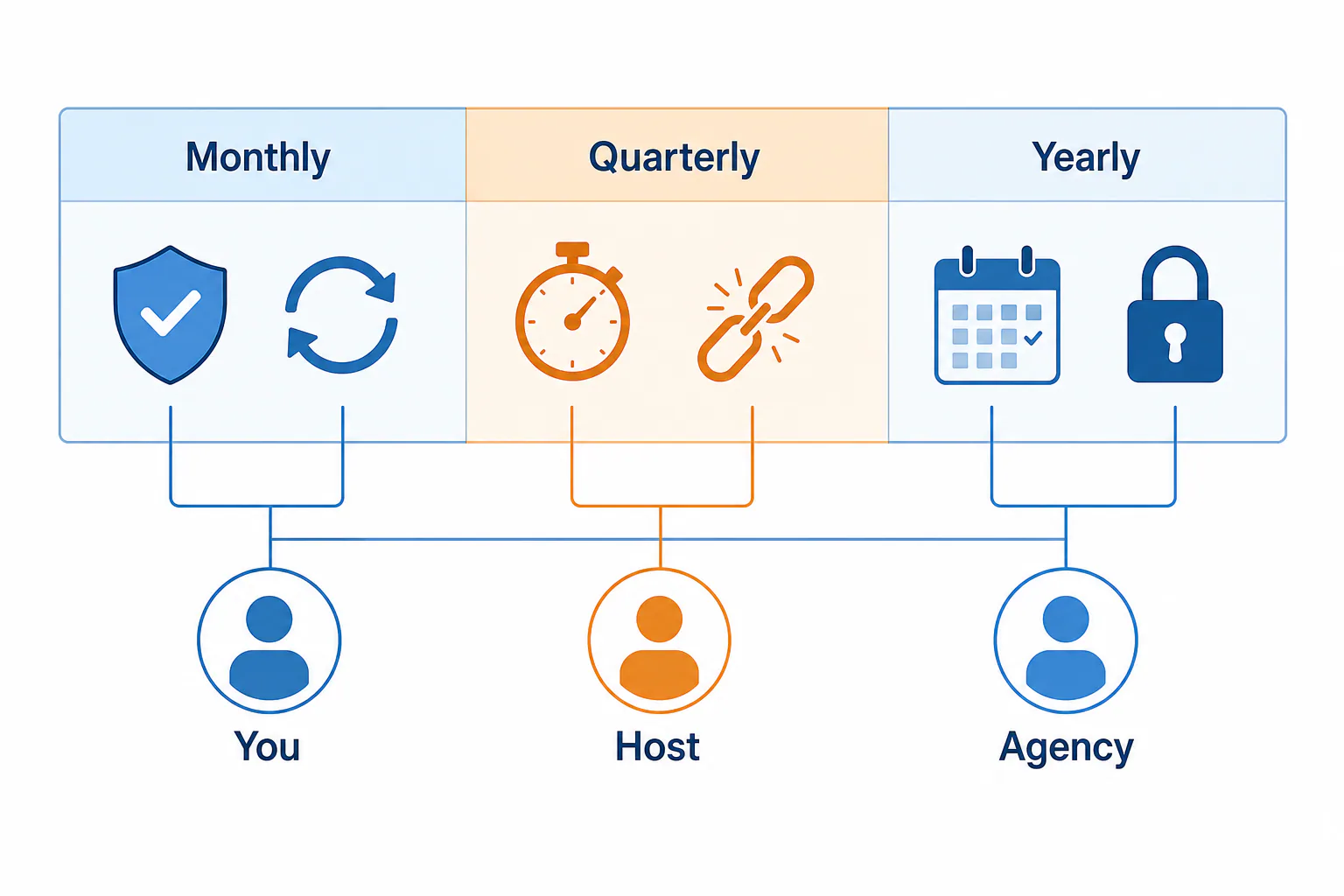
Who owns each task: you, your host or your agency
Write down who does what, because “I thought you were doing that” is how domains expire. A typical split looks like this:
| Task | Usually owned by | Note |
|---|---|---|
| Server uptime | Host | Monitoring alerts should reach you too |
| Core, add-on and theme updates | Host or agency | An agency tests after updating |
| Malware protection and backups | Host or agency | Keep one copy of your own |
| Content changes | You or agency | You decide what changes |
| Domain and account ownership | You | Never hand this over completely |
| Performance and SEO upkeep | Agency | Tied to search visibility |
How to Vet a Maintenance Provider Before You Sign
Get scope, response times and ownership in writing before you sign up for maintenance services. A good provider answers in plain words. A vague answer now usually means a vague answer during an outage.
Questions to ask about scope, backups and response time
- Which tasks are included each month, and what costs extra?
- Where are backups stored, and when did you last test a restore?
- How fast do you respond when the site is down, and is that in the contract?
- What performance monitoring do you run, and who gets the alerts?
- If I’m on a VPS, who patches the server?
- Which platforms do you maintain: WordPress only, or also Wix, Squarespace and Shopify? If I leave or switch platform, what happens to my site and domain?
Red flags in contracts and lock-in terms
Compare maintenance packages on these points, and push back if you see any of them:
- The domain or hosting account is in the provider’s name, not yours.
- You get no admin access, or no free export if you leave.
- Long contracts auto-renew with a short cancellation window.
- “Unlimited” support comes with no written response time.
- Someone promises guaranteed rankings. SEO results vary, and no honest provider can promise a spot on Google.
Start this week: confirm the domain is in your name, turn on auto-renew and find out where your backups live. Then use the rule above to decide if your host’s care is enough. If you’d rather hand it off, we bring 30 years of helping businesses online, and we’ll explain every line plainly.
Frequently Asked Questions
How much does it cost to host a business website?
How much does it cost to host a business website?
The price of web hosting depends on the plan type. Shared plans cost the least, managed plans more, and VPS or cloud plans more again. Compare renewal rates rather than intro prices, and check what’s included before you buy. If you’d rather pay one bill, our plan starts at $99.00 a month with the domain, managed hosting and maintenance included.
What is the easiest website host?
What is the easiest website host?
The easiest host is one that does the technical work for you. Managed hosting handles server setup and management, updates and backups, so you mostly log in to edit content. Bluehost, Hostinger and DreamHost are common beginner picks. Easiest of all is having someone else run the account, as long as it stays in your name.
Is free website hosting and maintenance worth it for a small business?
Is free website hosting and maintenance worth it for a small business?
Rarely. Free plans usually put ads on your site, give you a subdomain instead of your own address, cap storage and offer no real backups or support. They’re fine for testing an idea. A business site that customers judge you by needs its own domain, an SSL certificate and someone accountable when it breaks.
What happens to my site if I stop paying for maintenance?
What happens to my site if I stop paying for maintenance?
If hosting is billed separately, the site stays online, but updates and scans stop. Security risk then grows month by month, and things start breaking quietly. If maintenance was bundled with hosting, the site can go offline. Before you cancel, ask for a full backup, all your logins and the transfer details.
Who should own my domain name and hosting account?
Who should own my domain name and hosting account?
You should. Register both in your business’s name, using an email address you control. Then give your developer or agency their own user access. That way you can switch providers without asking anyone’s permission, and nobody can hold your website hostage over an unpaid invoice or a falling-out.